
TP-Link Omada ER8411 Review: A 10G Business Gateway That Actually Keeps Up With Your Fiber

Most small-business routers top out long before the circuit does. You sell a 2.5G or 10G fiber handoff, the customer’s switches are ready, and then the edge device chokes the whole thing back down to a gigabit. That is exactly the hole TP-Link built the Omada ER8411 to fill: a rack-mount VPN gateway with two 10G SFP+ cages, a quad-core 2.2 GHz CPU, and enough session capacity to actually route the pipe you’re paying for. After living with Omada gateways on a handful of installs, here’s the straight story on where this box shines and where you should think twice.
The Hardware: What You’re Actually Mounting
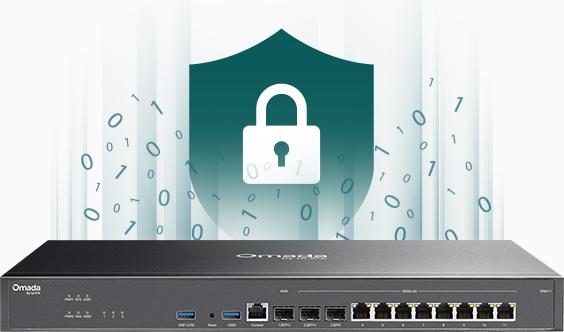
The ER8411 is a half-width steel rack-mount unit — 440 × 220 × 44 mm — with dual fans and, unusually at this price point, a redundant dual power supply (100–240 VAC). Draw is modest: TP-Link rates it at 19.12 W without USB devices and 26.36 W with USB loaded. In a comms closet that’s noise; on a shared UPS it’s a rounding error.
Ports break down as:
- 2× 10G SFP+ (1× WAN-dedicated, 1× WAN/LAN)
- 1× 1G SFP (WAN/LAN)
- 8× 1G RJ45 (WAN/LAN)
- 1× RJ45 console port
- 2× USB 3.0 (one supports LTE backup with a TP-Link LTE dongle)
Under the hood: 4 GB DDR4 DRAM, 4 MB SPI NOR + 256 MB NAND flash, 4 kV surge protection, and a reset button — that’s the whole exterior control surface. Installer note: the console port is a lifesaver on day one when the controller adoption hangs. Bring a USB-console cable anyway; nothing here is labeled RJ45-console-obvious once it’s buried behind patch panels.
Performance Numbers From TP-Link’s Spec Sheet
No guessing here — these are TP-Link’s published figures, and they’re the reason this gateway is worth the rack space:
| Metric | Rated Performance |
|---|---|
| NAT (static IP) | 9,445 Mbps up / 9,449 Mbps down |
| NAT (PPPoE) | 9,414 Mbps up / 9,102 Mbps down |
| Concurrent sessions | 2,300,000 |
| New sessions/second | 20,000 |
| 64-byte forwarding rate | 2,109,375 pps up / 2,011,719 pps down |
| IPsec throughput (ESP-SHA256-AES256) | 2,928 Mbps |
| WireGuard throughput | 1,411 Mbps |
| OpenVPN throughput | 1,043 Mbps |
| DPI throughput | 9,067 Mbps TCP / 5,873 Mbps UDP |
| IPS throughput | 9,388 Mbps TCP / 7,538 Mbps UDP |
Read those VPN numbers carefully, because they matter more than NAT throughput in real deployments. If your site-to-site tunnels ride WireGuard, you get roughly 1.4 Gbps — a huge jump over OpenVPN’s ~1 Gbps on the same box, and the reason I now default to WireGuard on every multi-site Omada build. IPsec at ~2.9 Gbps is genuinely fast for this class of hardware.
VPN and Security: Where This Box Earns Its Keep
Tunnel support is comprehensive: IPSec (300 tunnels), SSL VPN (500 tunnels), PPTP and L2TP (300 tunnels shared), OpenVPN (110 tunnels), WireGuard, and GRE in standalone mode. As a client it can terminate up to 32 PPTP/L2TP servers and 10 OpenVPN servers — handy if the customer needs to ride a third-party hub.
Security features on the spec sheet: signature-based IPS/IDS, DPI covering 2,421 application types, DoS/DDoS defense (TCP/UDP/ICMP flood, stealth scan blocking), IP/MAC/URL/content filtering, national-based ACLs, ARP inspection and IP-MAC binding, and DNS security with DNSSEC, DoH and DoT. In the field, DPI at 9 Gbps TCP means you can actually leave application-aware QoS and filtering switched on without carving your bandwidth in half — that’s not true of cheaper Omada gateways, and it’s the honest reason to step up to this model.
SD-WAN and the Omada Controller Question
Here’s the catch every installer needs to understand before quoting: SD-WAN multi-site features only work in controller mode, while GRE and some routing features (RIP, OSPF, timing-based link backup) are standalone-only. You pick a lane, or you accept what each mode gives you.
In practice, run the controller — hardware OC200/OC300, self-hosted software controller, or Omada Central cloud. Site-to-site SD-WAN then builds in a few clicks instead of hand-rolled tunnel configs, and you get zero-touch provisioning, automatic device discovery, captive portal, and the Omada mobile app. For a multi-site customer this is where the platform pays for itself in service-call reduction. Single-site with no controller? You still get the throughput, DPI, IPS and the primary VPN servers — just not the SD-WAN layer.
Real Install Use Cases
Multi-location professional services. Three offices, 1 Gbps fiber each, WireGuard mesh via SD-WAN. The session table absorbs the roaming traffic spikes and the dual PSU means one failed power brick is a parts order, not an outage.
MSP-managed edge for SMBs. Tiers matter here: put the ER8411 where there’s a real 10G handoff or more than ~500 active tunnels/sessions; smaller sites get the controller-managed gateways several tiers below it. The LTE/USB backup port gives every site a failover circuit without a second physical line.
Dense hospitality. The spec page markets exactly this — offices, schools, hotels — and the load balancing across up to 10 WAN ports plus application-optimized routing holds up when you’re bonding DIA circuits and prioritizing reservation/policy traffic over guest streaming.
Installer Notes Before You Rack One
Three things I wish someone had told me on the first ER8411 build. First, budget SFP+ modules and fiber per site up front — the 10G cages are pure SFP+, no RJ45 combos, and a missing DAC will stall a cutover. Second, decide the controller path before you ship the box: adoption over a fresh circuit is quick, but if the customer site has no route back to your controller or cloud region, ZTP dies and you are driving out there with a console cable. Third, test your VPN tunnel throughput before handing over — the published numbers assume clean conditions, and a tunnel that tops out well under spec usually means the upstream handoff is negotiation-limited, not the gateway.
Pros and Cons
Pros:
- True 10G edge: dual SFP+ and ~9.4 Gbps NAT — no oversold gigabit bottleneck
- Redundant dual PSUs and rack-mount steel chassis at a price that undercuts enterprise-brand equivalents
- WireGuard/IPsec/OpenVPN/PPTP/L2TP/GRE with strong rated throughputs
- DPI and IPS fast enough to leave enabled (9 Gbps+ TCP)
- LTE backup via USB, 4 kV surge protection, console port
- Omada SDN: controller-based management, ZTP, app access, per-site SD-WAN
Cons:
- SD-WAN requires an Omada controller (extra cost or self-hosted box); GRE/OSPF/RIP only standalone — you can’t have both feature sets at once
- All-RJ45-WAN layout means you plan SFP+ module stock per site (no combo cages)
- Captive portal vouchers/SMS/RADIUS features need the controller too
- No PoE out anywhere on the box — console/deskside switchports come from the switch side of the rack
Bottom Line
If the customer is paying for multi-gig or 10G fiber, putting a gigabit-class router in front of it is malpractice. The ER8411 is TP-Link’s answer for installs where the edge needs to keep up: real 10G silicon, dual power supplies, WireGuard speed, and a management platform that scales past the single-site demo. Pair it with an Omada controller from day one and it’s one of the best value-per-rack-unit gateways I’ve put in front of SMB and light-enterprise clients. Get the SD-WAN licensing/controller path wrong and you’re paying for features you can’t switch on — spec it in the quote, not after the cutover.
Planning a multi-gig edge or a multi-site consolidation? Get in touch and I’ll spec it right the first time.
Specifications and product imagery courtesy of TP-Link’s official ER8411 product page (tp-link.com). Performance figures as published by the manufacturer.
