
UniFi Protect 7.3: Super Encoding, Dashboard Time Machine, and What Installers Need to Know
Ubiquiti shipped UniFi Protect 7.3.70 on October 2, 2026, and even though it is sitting behind the Release Candidate label, the shape of this release is clear: Ubiquiti is done chasing raw megapixels and has pivoted hard toward storage economics and search intelligence. For installers and anyone running their own NVR, 7.3 is the release that finally makes long retention windows practical without buying a shelf of hard drives. Here is what actually landed, what the early field reports say, and how to roll it out without surprises.
Super Encoding: the 50% claim
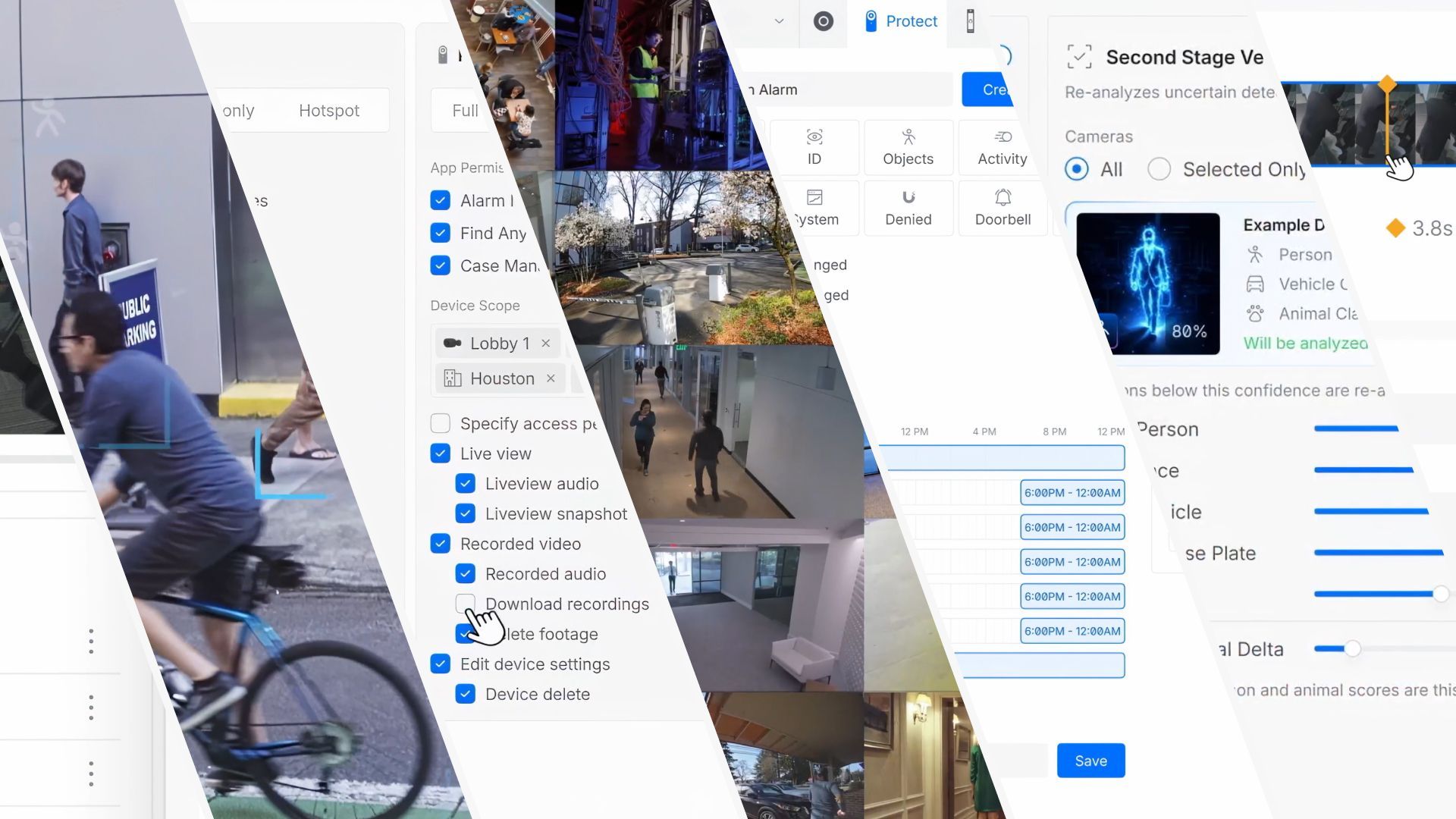
Headline feature first: 7.3 adds a Super Encoding setting inside Storage Budgeting, and Ubiquiti claims up to 50% better storage efficiency. In plain terms, it consolidates the older Enhanced Encoding and Advanced Encoding paths into a single smarter pipeline that decides per-scene where the bitrate is actually needed — static backgrounds get squeezed, motion detail keeps its bits. Early community reports confirm the setting works as advertised on supported cameras, with the usual asterisk: the biggest gains are on AV1-capable cameras, and a few G series users (the G6 180 thread on the official release page) report quality regressions when Super Encoding is forced on and prefer to leave it off. Our take for installs: enable it on new AI-series and G5-family cameras, spot-check the edge models you actually deploy, and re-quote your retention math before you upsell the bigger UNVR.
Dashboard Time Machine
The other flagship feature is Dashboard Time Machine — a scrubable, glanceable review of past activity across your whole site. Instead of opening recordings camera by camera, you get a time-based dashboard view of what happened when. For service techs and small-business owners this is the difference between “the cameras work” and “I can answer the owner’s question in ninety seconds.” It pairs naturally with the improved Playback range selection shipped in the same release.
Find Anything and Sensor Manager overhauled
Find Anything gets its first real upgrade since launch: Manage Identifications with drag-and-drop assignment, notification controls, and UniFi user identification; Most Recent and Commonality views that put people and license plates one click from the search bar; and detection activity charts with better filtering. Face groups now link directly to users in the console’s People section. Sensor Manager grew event charts, enhanced filtering, and customizable columns — small words in the changelog, big quality-of-life for anyone who monitors door contacts, glass break, or environmental sensors across a commercial site. The G6 180 Enhancer also gained a Buzzer option in Alarm Manager.
The bugfix list is the tell
Scroll the changelog past the features and a pattern shows up: dozens of fixes around alarms, playback, and PTZ. Global Alarm Manager alarms that died after upgrades. Face Recognition and LPR alarms failing on AI Key–enhanced cameras. Line Crossing and Speed alarm corrections. PTZ cameras returning home mid-control. Storage drives appearing removed after reboot. Third-party ONVIF camera settings being overwritten on reconnect. None of these are demo features — every one of them is a service call. A release this deep in fixes tells you Ubiquiti knows the alarm pipeline carries production weight now, and they are hardening it for exactly the sites that depend on it.
Early field reports worth knowing about
- Safari users, take note: multiple community reports say Safari 27 on macOS breaks Protect playback (a WSS certificate issue on port 7433) regardless of Protect version. Chrome works. If you support Mac-heavy offices, pin your expectations to Chrome or the Protect app until this resolves.
- Super Encoding on edge models: G6 180 owners report choppy playback and quality losses at high-quality settings — treat it as opt-in per camera, not global.
- Update fatigue is real: the community thread has users asking for update snooze on cameras, not just the application. Until that ships, plan upgrade windows yourself.
Use cases: who should care, and what to do
The storage-efficiency install. If you spec’d 30-day retention and the customer’s UNVR is full at 18 days, Super Encoding is the free upgrade they were hoping for. Re-run your capacity estimates on 7.3 before quoting the second UNVR — you may sell zero extra drives.
The multi-site service provider. Time Machine plus the Find Anything overhaul (Commonality views, cross-linking face groups to console users) is clearly aimed at operators managing several sites from one console. Standardize your SOPs on these views now, before Ubiquiti bakes them into training material.
The alarm-driven deploy. If your install leans on glass-break, door contacts, and LPR triggering Alarm Manager actions, 7.3 is basically an alarm-pipeline patch release. Test every alarm path in staging before production — but plan for it to work.
Pros and cons
Pros: up to 50% storage efficiency gains via Super Encoding; Dashboard Time Machine saves real time on real investigations; Find Anything finally behaves like a searchable database instead of a search box; Sensor Manager matured to match; deep bugfix pass across alarms, PTZ, storage, and third-party cameras.
Cons: it’s a Release Candidate — Ubiquiti’s RC naming still means “test before production”; Super Encoding quality varies by camera model and early adopters are dialing it back per-camera; Safari playback is broken on Safari 27 independent of this release; update-snooze still doesn’t exist for cameras. No per-camera scheduling for Super Encoding — it’s all-on/all-off per supported device group today.
Bottom line
7.3 is the most operationally useful Protect release in a year: the feature that gets talked about (Super Encoding) saves real money, and the features that get blogged about less (Time Machine, Find Anything, Sensor Manager) are the ones that save labor on the jobs. Roll it to staging this week, verify your alarm paths and your edge-case cameras, and schedule production installs with a Safari caveat taped to the monitor. And if you’re pairing Protect with the bigger UNVR G2 or UNAS Pro hardware — the storage fixes landing in this release make those boxes finally stretch their legs.
Sources
Release notes and community reports from Ubiquiti’s official UniFi Community release page (UniFi Protect Application 7.3.70, published October 2, 2026). Feature claims — Super Encoding efficiency, Dashboard Time Machine, Find Anything and Sensor Manager changes, and bugfix list — quoted from Ubiquiti’s published changelog; early-user field reports noted as community-sourced. Product images: Ubiquiti Inc. (reused from our prior Protect coverage).
Want your Protect deployment audited against 7.3 before you update? Get in touch.
