
Synology UC3400 Review: The Active-Active SAN That Undercuts Enterprise Prices
When a customer has a hypervisor cluster that cannot go down, the conversation usually ends at a whiteboard with two words: active-active. Synology’s answer to that conversation is the UC3400, their flagship dual-controller iSCSI and Fibre Channel SAN. It is not a DiskStation with a second power supply taped on — it is a genuinely different architecture with two full controllers exchanging state over a non-transparent bridge, and it is the first Synology box I’d put in front of a client who is pricing out entry-level enterprise SANs without paying enterprise SAN prices.
What the UC3400 actually is
The UC3400 is a 2U, 12-bay dual-controller SAN serving block storage over both iSCSI and Fibre Channel. Each controller is a full machine in its own right: its own Intel Xeon D-1541 (8-core, 2.1 GHz base / 2.7 GHz turbo, 64-bit, hardware encryption engine), its own 8 GB DDR4 ECC UDIMM expandable to 64 GB per controller, its own pair of 60 mm fans, its own 500 W power supply. Both controllers own all the drives simultaneously — that is the active-active part — and the NTB inter-domain link protects in-flight I/O when a controller drops. That is the whole point of the box, and it is the line I put on the quote when a client asks why it costs more than an RS1226+.
Verified specifications
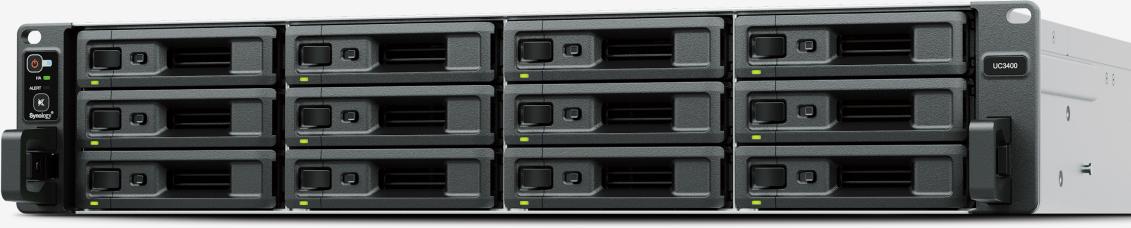
| Item | UC3400 (per Synology official specs) |
|---|---|
| Controllers | 2 (active-active), NTB inter-domain communication |
| CPU | Intel Xeon D-1541, 8-core, 2.1/2.7 GHz, one per controller |
| Memory | 8 GB DDR4 ECC UDIMM per controller, 4 slots, max 64 GB per controller |
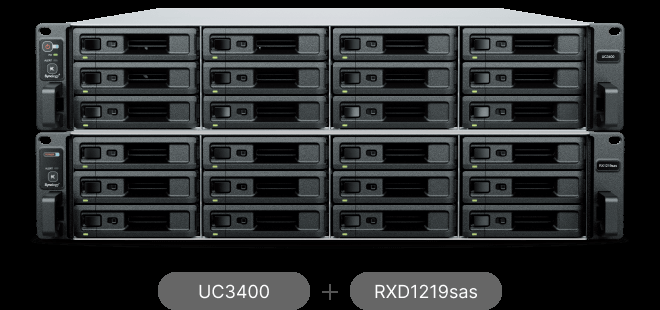
| Drive bays | 12; max 36 with 2x RXD1219sas expansion units (dual-port SAS SSD/HDD only) |
| Protocols | iSCSI and Fibre Channel |
| Performance (Synology-tested) | Over 199K 4K random write IOPS over FC, over 189K over iSCSI; over 455K IOPS 4K random mixed on FC, over 374K on iSCSI |
| Built-in ports | Per controller: 2x 1GbE RJ-45 (LAG/failover), 1x 10GbE RJ-45 |
| PCIe expansion | 1x Gen3 x8 slot per controller; supports 10GbE, 25GbE NICs and FC HBAs |
| Filesystem | Btrfs |
| Size / weight | 88 x 482 x 724 mm with ears, 19.7 kg, 4-post 19-inch rack (Rail Kit RKS-02, sold separately) |
| Power / noise | Redundant 500 W PSUs, 100-240 V AC; noise level 51.3 dB(A) |
| Virtualization | VMware vSphere, Hyper-V, Citrix XenServer, OpenStack Cinder; ODX, VAAI, ALUA |
| Data protection | Snapshot Replication with app-aware snapshots, self-encrypting drive (SED) support |
| Warranty | 5-year limited (Synology drives: 5-year warranty) |
A note from the field on the drive support: this is a SAS-only box. Dual-port 2.5-inch SAS SSDs and 3.5-inch SAS HDDs, and Synology only guarantees full functionality with drives on their compatibility list. If your client expects to populate it with whatever SATA drives are on sale, they need a different product — the dual-port SAS backplane is exactly what you are paying for, because single-path SAS drives would defeat the entire dual-controller design.

Memory and expansion: spec it right the first time
You get 8 GB ECC per controller as shipped, four SODIMM slots per controller, max 64 GB per controller. For production VM workloads I spec to the max on both controllers at install time — Synology’s own compatibility language says they will not provide full warranty or support for the system if non-Synology memory is used for expansion, and on an HA box that argument is not worth having with a customer’s IT director two years down the road. Same logic on the PCIe slots: one Gen3 x8 slot per controller means your FC HBA or 25GbE card goes in each side, and it must go in both, because a single-controller expansion path is a single point of failure dressed up as redundancy.
Real install use cases
VMware or Hyper-V boot LUNs for a small cluster. This is the bread and butter. Two ESXi hosts, a pair of FC or 25GbE switches (or four 10GbE paths on the built-in ports), VAAI and ALUA doing the heavy lifting, and the customer gets vMotion and HA failover without VMware’s enterprise-plus SAN tax. Snapshot Replication’s app-aware snapshots give you instant VM recovery on iSCSI LUNs, which is a genuinely useful disaster story on a mid-size budget.
Ransomware-resistant block target. Btrfs snapshots plus SED support means data at rest gets hardware encryption and point-in-time recovery in the same box. Pair it with Snapshot Replication to a Synology NAS and you have a two-tier protection plan that audits love.
OpenStack Cinder block storage. Officially supported, and for the MSP crowd running private cloud on a budget, having Cinder in the compatibility matrix instead of an asterisk is a real differentiator.
Installer notes before you rack it: with ears it is 724 mm deep — measure the cabinet, not the spec sheet photo. 19.7 kg empty means a two-person lift or a rail kit (RKS-02, ordered separately, every single time — nobody remembers to quote it). The 51.3 dB(A) noise figure means this lives in a server room, not an office closet. And bring the correct SFP+ or DACs for both controllers; the built-in 10GbE is RJ-45, so a pure-fiber build still wants copper for management or a card on each side.
Pros and cons
Pros:
- True active-active dual controllers with NTB-protected failover at a price point well under enterprise SAN brands
- Dual-protocol: iSCSI and Fibre Channel in one platform
- ECC memory and Xeon on both controllers — proper enterprise building blocks
- ODX, VAAI, ALUA, OpenStack Cinder — the integration checkboxes are all ticked
- Btrfs snapshots, SED support, Snapshot Replication built in
- 5-year limited warranty
Cons:
- Drive bays are dual-port SAS only — no SATA, and Synology pushes their own compatibility list hard
- 12 bays expanding to 36 is modest next to Synology’s own SA/HD series when pure capacity matters more than HA
- No 25GbE or FC ports built in — expansion cards per controller are an extra line item on both sides
- Rail kit and drives sold separately; the real street price is well above the bare box
- 51.3 dB(A) — office deployments are a non-starter
Bottom line
The UC3400 is Synology’s most serious storage product, and it earns the badge: real dual controllers, real ECC, real enterprise protocols, real failover. For a small-to-mid-size virtualization cluster that needs zero-downtime block storage — and a client who flinches at six-figure SAN quotes — it is the value play in the category. Spec the memory to the max on day one, put a card in both controllers, order the rail kit, and keep it in a proper server room. If the customer only needs capacity and can tolerate a storage vMotion window, a single-controller XS-series box will save them money; if they need the cluster to not notice a controller failure, this is the box.
Thinking about a SAN refresh or a virtualization storage build? Get in touch and I will spec it properly.
Specifications and performance figures from Synology’s official UC3400 product page; product images courtesy of Synology Inc.
