
TP-Link Omada Pro S5500-48GP4XF Review: The 500 W PoE+ Switch That Made Me Stop Price-Shopping the Enterprise Brands
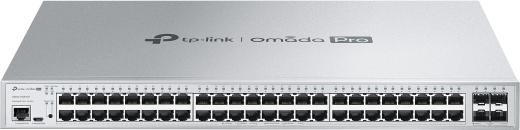
Why the S5500-48GP4XF Earns Rack Space
Most 48-port PoE+ switches in the value bracket give you exactly one uplink budget and wish you luck. TP-Link’s Omada Pro S5500-48GP4XF gives you 48 PoE+ ports backed by a 500 W power budget and four real 10 Gbps SFP+ uplink slots, which means the access layer stops being the chokepoint the moment you hang a NAS or an aggregating core off it. For integrators building single- or dual-gig access networks with a 10G handoff, it does the job the enterprise brands charge twice as much for.
This is the L2+ tier of the Omada Pro line, and the distinction matters. You get static routing, ERPS ring protection, and full L2+ feature depth without paying for a full L3 core switch you will never configure. Here is exactly what the datasheet says, because none of it needs embellishing.
Verified Specifications (TP-Link Official Site)
| Ports | 48× 10/100/1000 Mbps RJ45, all PoE+ (802.3at/af), up to 30 W per port |
| Uplinks | 4× 10G SFP+ slots |
| PoE power budget | 500 W total |
| Switching capacity | 176 Gbps, 130.94 Mpps forwarding |
| Packet buffer / jumbo frames | 12 Mbit / 9 KB |
| MAC address table | 16 K entries |
| Console | 1× RJ45 console port + 1× micro-USB console |
| L3 features | 16 IPv4/IPv6 interfaces, 48 static routes, static ARP (128), 512 ARP entries, proxy ARP, DHCP server/relay/L2 relay |
| Resilience | ERPS, STP/RSTP/MSTP with full STP security suite, LACP (8 groups), loopback detection |
| VLAN | 4K VLAN groups, 802.1Q, private VLAN, voice VLAN, QinQ with VLAN mapping/replace |
| Security | ACL (MAC/IP/combined/IPv6), IP-MAC-Port binding (512), DHCP snooping, dynamic ARP inspection, 802.1X with MAB and guest VLAN, TACACS+/AAA, storm control, port isolation, HTTPS/SSH management |
| QoS | 8 priority queues, 802.1p CoS/DSCP, SP/WRR scheduling, port/flow rate limiting |
| Multicast | IGMP v1/v2/v3 snooping, MLD snooping, MVR, 1000 multicast groups |
| Carrier features | 802.3ah Ethernet Link OAM, L2PT, DLDP, PPPoE ID insertion, DDM, sFlow |
| Management | Omada Pro Controller (cloud or software), CLI, web GUI, SNMPv1/v2c/v3, LLDP/LLDP-MED, dual image/dual config, cable diagnostics, remote packet capture |
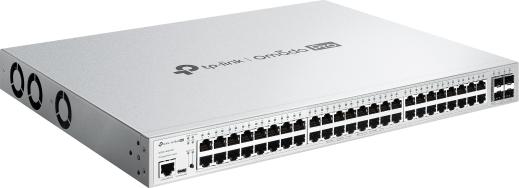
| Power / thermal | 100–240 VAC; 49.19 W idle (no PD), 635.70 W at full 500 W PoE load; 3 fans |
| Dimensions | 440 × 330 × 44 mm (17.3 × 13.0 × 1.7 in), rack mountable |
| Operating range | 0–40 °C (32–104 °F), 10–90% RH non-condensing |
What Installer Notes Earns in the Field
The 500 W budget is the headline. Forty-eight PoE+ ports with 30 W each sounds like 1,440 W of demand against a 500 W supply, which is why TP-Link adds the asterisk and so should I. In practice you plan for real loads: forty Wi-Fi 6 APs at 15 W average and a dozen cameras at 8 W lands right around 680 W worst-case, so know your PD census before you commit. Run every port at full at/af class draw in a hot closet and the switch will shed, not negotiate.
Four SFP+ slots change the topology conversation. On single-uplink value switches, everything behind one 1G fiber runs through one bottle neck. With four 10G uplinks you can LACP two of them to the core, keep two spare for a second core or a direct NAS handoff, and build an ERPS ring if the site has the fiber for it. That LACP plus ERPS combination is what earns it a spot on multi-switch campus edges.
The dual console is a small thing that matters. RJ45 plus micro-USB means you always have a cable that works at 2 a.m. In a data closet with a laptop that lost its USB-C dongle, you will think about this switch fondly.
Management requires an Omada Pro Controller for the good parts. Zero-touch provisioning needs the cloud-based Pro controller. Standalone web GUI is fine for a single closet switch, but the anomaly detection and fleet management that justify picking Omada Pro need the controller in play. Budget it into the quote like you would a UNMS or Infra server.
Management: Where the Value Actually Lands
The Omada Pro ecosystem is the reason to pick this switch over a no-name 5500-class box. The controller does what fleet managers actually need: bulk firmware across every site, mass VLAN edits without a laptop in every closet, intelligent anomaly detection that flags a flapping port before the customer calls, and a mobile app for the 6 p.m. “is that switch running hot?” check. On the box itself the CLI is competent if you prefer SSH, SNMPv3 traps feed any decent NMS, and dual image plus dual config gives a failed firmware push a rollback target instead of a truck roll. Per-port cable diagnostics pay for themselves the first time someone blames the switch for a bad patch cord. One honest caveat for quoting: the anomaly detection and zero-touch provisioning callouts require the Omada Pro Controller — ZTP specifically needs the cloud-based version — so budget it into the quote like you would any management appliance.
Pros and Cons
Pros:
- 500 W PoE+ budget across all 48 ports — genuinely useful for dense AP/camera deployments
- 4× 10G SFP+ uplinks at a price point where rivals ship one or two
- Real L2+ feature set: ERPS, QinQ, static routing, LACP, full STP security
- Carrier-grade touches (802.3ah OAM, sFlow, LLDP-MED) rare in this bracket
- Dual image and dual config — safe firmware upgrades with a rollback target
- Omada Pro central management with mobile app and ZTP at scale
Cons:
- 500 W budget means it can’t feed all 48 ports at full 30 W at once — plan PD loads
- Three fans at up to ~636 W full load; not a closet-quiet switch under PoE load
- ZTP and intelligent anomaly detection require the Omada Pro Controller, not standalone
- L2+, not full L3 — no dynamic routing (OSPF/BGP), so it stays an access/aggregation tier device
Where It Fits Best
This is a midsize-office and light-campus switch: the 48-port edge for a 60–120 person office running Wi-Fi 6/7 APs, VoIP handsets, and a dozen cameras, uplinking over fiber to a 10G core. It is also the value pick for ERPS ring topologies in outdoor or campus loops where a single value switch’s lone SFP+ would be a single point of failure. If the site needs dynamic routing at the edge, put a real router above it and treat this as the workhorse access layer it is.
Bottom Line
The S5500-48GP4XF is TP-Link making the arithmetic argument enterprise brands hate: a 500 W, 48-port PoE+ access switch with four 10G uplinks and a feature sheet — ERPS, QinQ, sFlow, 802.1X with MAB, dual-image — that reads like the big-kid table. Plan your PoE census, budget for the Omada Pro controller, and give it airflow at full load, and it will quietly run the edge of the network for years. For installers who want the feature depth without the enterprise invoice, it belongs on the quote.
Considering this switch for a build? Get in touch and we’ll price it into your design.
Product photos courtesy of TP-Link official product pages; specifications quoted from TP-Link’s official S5500-48GP4XF datasheet.
