
Synology DS1825+ Review: The 8-Bay Plus-Series NAS That Multi-Gigs Straight Out of the Box
When a shop moves from two-bay desktop boxes to a real workhorse NAS, the 8-bay tier is where most installer-integrator projects land. Synology’s DS1825+ is the current-generation Plus-series flagship in that space: eight bays, dual 2.5GbE out of the box, ECC memory, and a PCIe slot for 10G or 25G when the network demands it. Here’s the full verified spec rundown and where this box actually earns its place on the rack shelf.
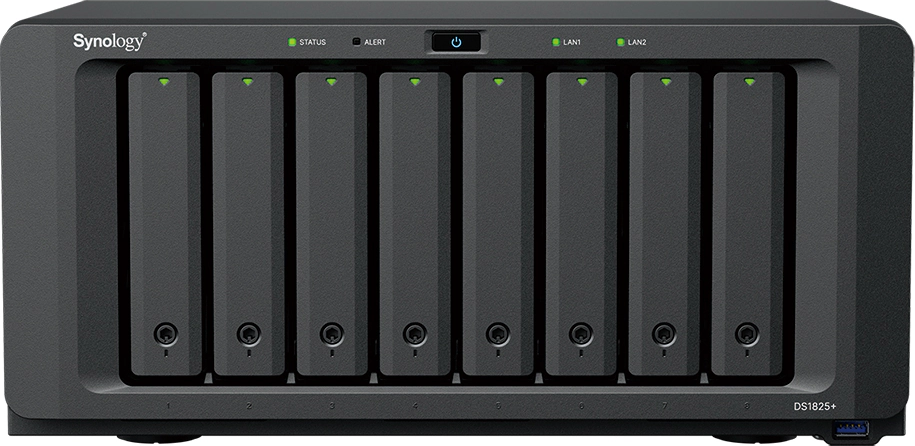
Verified specifications (from Synology’s official spec page)
| Component | DS1825+ |
|---|---|
| CPU | AMD Ryzen V1500B, 4 cores / 8 threads, 2.2 GHz, 64-bit, hardware encryption engine |
| Memory | 8 GB DDR4 ECC SODIMM (1 × 8 GB installed), 2 slots, max 32 GB (2 × 16 GB) |
| Drive bays | 8 × 3.5″ SATA HDD or 2.5″ SATA SSD, hot-swappable |
| M.2 | 2 × M.2 2280 NVMe (cache or storage pool; drives sold separately; not hot-swappable) |
| Expansion | Up to 18 bays / 360 TB raw with 2 × DX525 expansion units |
| Networking built-in | 2 × 2.5GbE RJ-45 (over 2,239 / 1,573 MB/s sequential read/write per Synology’s internal testing) |
| PCIe | 1 × Gen3 x8 slot (x4 link), supports up to 25GbE NIC (E25G30-F2) or 10GbE |
| Other ports | 3 × USB 3.2 Gen 1, 2 × expansion ports (USB Type-C) |
| Fans / noise | 2 × 120 mm, easy-replacement; 23.8 dB(A) idle with Synology HDDs |
| Power | 250 W PSU; 60.1 W access / 18.34 W HDD hibernation; power recovery, WoL/WAN, scheduled on/off |
| Size / weight | 166 × 343 × 243 mm, 6 kg (desktop form factor) |
| Warranty | 3-year hardware, extendable to 5 with EW201 / Extended Warranty Plus |
Who this box is really for
Synology’s Plus series sits between the value line and the rackmount xs/XS+ line, and the DS1825+ is the biggest desktop Plus you can buy. That positioning matters: this is the box for the integrator whose client has outgrown a four-bay unit but has no rack, no datacenter cooling, and no appetite for server-grade noise. If the deployment lives on a shelf in a back office or a closet that gets opened once a month, a desktop-form-factor eight-bay with near-silent idle behavior is a feature, not a compromise. If the client has a proper 42U rack and redundant power, buy the rackmount equivalent instead and thank yourself later.
What DSM brings to the table
The hardware is only half the sale. DSM 7.x on this box covers file sync and share with versioning, multi-site one- or two-way NAS-to-NAS replication, centralized backup of PCs, VMs, SaaS apps and mobile devices through Active Backup with proper 3-2-1 configurations, immutable snapshots against ransomware-style tampering, and Surveillance Station supporting over 8,700 camera models with two licenses included. For a shop that wants one box doing files, backup, surveillance, and Docker test labs with Virtual DSM isolation, this platform genuinely does all four. Synology’s Active Insight and Central Management System handle fleet monitoring, group policies, and batch updates when you run more than one box on a customer site.
Real install use cases
Backup target for a 15-25 seat office. Fill four bays with enterprise HDDs in SHR-2, reserve two matched pairs for SSD-cached production shares, and point Active Backup for Business at every workstation. The ECC memory and the Ryzen encryption engine mean the box can drive both 2.5GbE links near saturation doing simultaneous backup and restore without DSM stuttering.
Hybrid production storage for creative shops. Video editors living on project files benefit immediately from NVMe cache plus the 2,239 MB/s read ceiling; put the working volumes on SSD bays and archive on spinning rust. Installer note: Synology only guarantees performance with drives on their compatibility list — quote Synology HAT5300/HAT3300/SAT5200/SNV3400-5400 series or eat the warranty caveat.
On-prem surveillance. Synology rates this box for 40 IP cameras at 1080p with two licenses included. For anything beyond that the license math adds up fast — put it in the quote line items before the customer sees the invoice.
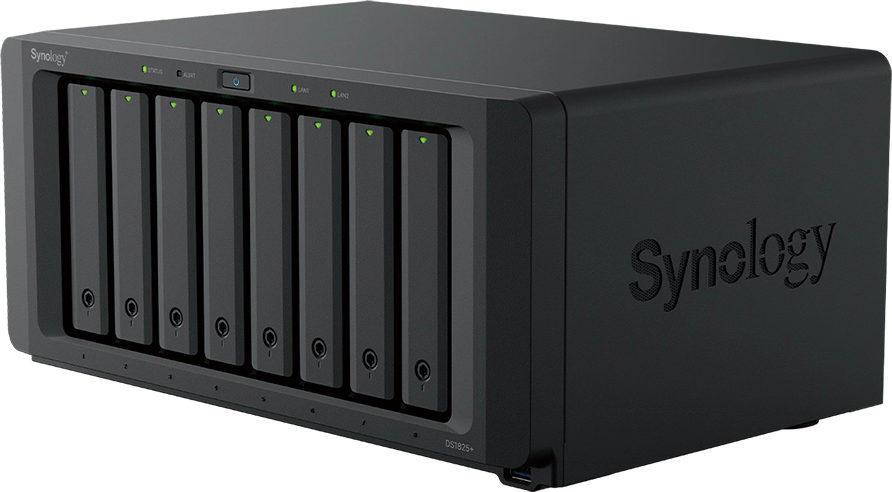
How it stacks up against the four-bays it replaces
Compare it honestly to the DS425+ most shops are running today. The DS1825+ doubles the bays, doubles the maximum expandable capacity (360 TB raw with a pair of DX525 units versus the four-bay line’s expansion ceiling), keeps dual 2.5GbE, and adds the PCIe expansion slot for 10G/25G — the four-bayers generally don’t have a slot to put a NIC in. It also carries real server-grade DNA: ECC memory standard and a Ryzen V1500B with a hardware encryption engine, which matters when the box is doing simultaneous encrypted backup ingest and SMB serving. The DX525 expansion units are sold separately and so are drives, cache SSDs, and the NIC, so the sticker price understates the true system cost by a few hundred dollars. Budget accordingly and the value case is straightforward: for a growing shop this is the cheapest entry into ECC plus multi-gig-plus-expandable storage in Synology’s desktop lineup.
Pros and cons
Install notes from the field
A few things that separate a clean DS1825+ deployment from a callback. First, buy the memory on Synology’s compatibility list (D4ES03-8G / D4ES03-16G ECC SODIMM) — Synology’s warranty language is explicit that non-listed memory voids full support, and ECC only counts if it’s genuine ECC. Second, populate both 2.5GbE ports and bond them (active-backup or LACP if the switch supports it) before migrating any production share; link failure on a single cable is the cheapest redundancy you will ever install. Third, the M.2 slots take 2280 NVMe drives but are not hot-swappable — install cache drives before the array goes into service, because pulling the board to swap a cache SSD means downtime. Fourth, if you quote a 10G or 25G NIC, remember the slot is a Gen3 x8 physical with a x4 electric link — a single-port 25G card tops out around that link width, so set performance expectations in the proposal, not after go-live. Finally, if you pair the NAS with a Synology RT6600ax or WRX560 router, DSM’s threat detection and VLAN tooling talk to each other, which is a genuinely useful selling point for clients who want one management interface.
Pros: ECC RAM standard at this price point; dual 2.5GbE means multi-gig works day one without a NIC; PCIe Gen3 slot ready for 25G; dual M.2 cache; near-silent at 23.8 dB so it can live in an office, not just a comms room; software licensing mostly all-inclusive (Active Backup suites are license-free for supported targets).
Cons: The PCIe slot is electrically x4 — a full x8 25G card runs at x4 bandwidth; expansion units and Synology-brand drives/memory are where the real system cost hides; Surveillance Station camera licenses beyond the included two add up; no front-lockable tray keying on base units in some SKUs — verify on the specific SKU you buy.
Bottom line
The DS1825+ is the sweet spot in Synology’s lineup right now for shops that outgrew four bays but don’t need rack-mount server hardware. ECC, dual 2.5GbE, NVMe cache, and a 25G-ready slot at this price is a strong bill of materials — and DSM’s backup and surveillance stack keeps it a one-box solution for most SMB integrations. If your customer needs more than 360 TB raw or active-active failover, that’s a rackmount UC-series conversation — get in touch and we’ll spec it.
Product specifications sourced from Synology’s official DS1825+ product page. All product images courtesy of Synology Inc.
