
Synology DS225+ Review: The 2-Bay NAS That Put Four Cores and 2.5GbE Under My Desk
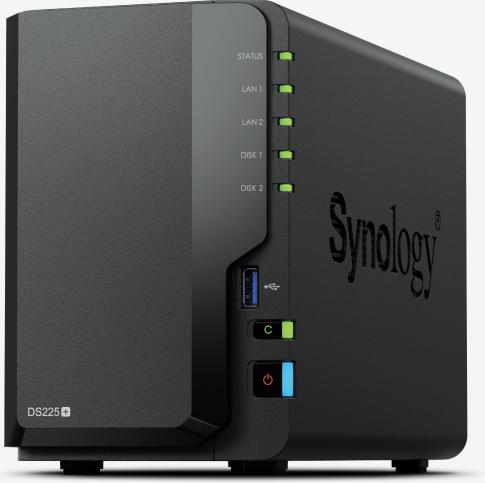
The DS225+ is Synology’s entry point into the Plus series, and calling it “entry level” undersells what it does for the money. Two drive bays, a quad-core Intel CPU with a hardware encryption engine, a real 2.5GbE port, and silent-enough-for-the-office acoustics — it’s the box I put on desks and shelf mounts when the job is file services, backup targets, and a handful of cameras for one site. Here’s everything Synology actually publishes about it, and where it fits (and doesn’t) in a real deployment.
The verified spec sheet
All figures below are taken straight from Synology’s official DS225+ product page — no forum math, no reviews quoting other reviews.
- CPU: Intel Celeron J4125, 4 cores / 4 threads, 2.0 GHz base / 2.7 GHz burst, 64-bit, with hardware encryption engine
- Memory: 2 GB DDR4 non-ECC, one slot, expandable to 6 GB (2 GB + 4 GB) using Synology D4NS01-4G modules
- Drive bays: 2 × 3.5″ SATA HDD or 2.5″ SATA SSD, hot-swappable, up to 40 TB raw
- Networking: 1 × 2.5GbE RJ-45 + 1 × 1GbE RJ-45 (the 1GbE port is capped at 1500 MTU)
- USB: 2 × USB 3.2 Gen 1 with front-panel Copy button
- Performance (Synology lab): over 282 / 217 MB/s sequential read/write — comfortably past what you’ll see on a gigabit link, and reads run near 2.5GbE line speed in the small-file tests
- Acoustics & power: 19.6 dB(A) idle, single 92 mm fan, 16.98 W access / 6.08 W HDD hibernation on the 60 W adapter
- Size: 165 × 108 × 232.2 mm, 1.3 kg
- Software ceiling: up to 25 IP camera channels in Surveillance Station, 3-2-1 backup tooling, immutable snapshots, NAS-to-NAS sync, Central Management System and Active Insight for fleet management
- Warranty: 3 years, extendable to 5 with Extended Warranty Plus (North America and Europe)
- In the box: main unit, accessory pack, AC adapter and cord, two RJ-45 cables
DS225+ vs. DS725+: the sibling you’ll be asked about
Every second quote I do has someone asking why they shouldn’t just pay up for the DS725+. Fair question — Synology’s own spec pages draw the line clearly.
| DS225+ | DS725+ | |
|---|---|---|
| CPU | Intel Celeron J4125, 4C/4T, up to 2.7 GHz | AMD Ryzen R1600, 2C/4T, up to 3.1 GHz |
| Memory | 2 GB DDR4 non-ECC, 1 slot, max 6 GB | 4 GB DDR4 ECC, 2 slots, max 32 GB |
| Drive bays | 2 SATA (no M.2) | 2 SATA + 2 M.2 NVMe |
| Expansion | None | DX525 unit → 7 bays; USB Type-C expansion port |
| Networking | 1 × 2.5GbE + 1 × 1GbE | 1 × 2.5GbE + 1 × 1GbE |
| USB | 2 × USB 3.2 Gen 1 | 1 × USB 3.2 Gen 1 |
| SSD cache | Select compatible SSDs (model-specific support) | M.2 NVMe cache, native |
| Warranty | 3 yr (extendable to 5) | 3 yr (extendable to 5) |
The short version: the DS725+ is the ECC-and-NVMe machine; the DS225+ is the four-core value play. The quad-core J4125 is the surprising one here — four real cores with a hardware encryption engine will out-muscle the dual-core Ryzen on transcoding and container workloads even though the Ryzen wins on single-thread burst and ECC. Which matters more depends entirely on the job, which is the whole point of a lineup like this.
Where it earns its rack space (or desk corner)
Small-office file server with room to grow
For a five-to-fifteen-person office that lives in shared folders, the DS225+ handles SMB, quotas, and snapshots without breaking a sweat. Installer note: put the 2.5GbE port on the LAN and leave the 1GbE for management or failover — and remember the 1GbE side is stuck at 1500 MTU, so don’t build your jumbo-frame plan around it. Two bays means one RAID 1 volume; buy matched drives from Synology’s compatibility list, because that’s the one place where “any SATA drive” advice quietly stops being true.
Edge backup target and the 3-2-1 leg
The 40 TB raw ceiling, immutable snapshots, and Hyper Backup task automation make this a natural offsite or branch target. At under 7 watts during hibernation it’s cheap to leave on 24/7 in a closet, and Active Insight plus Central Management means you can run a dozen of these across sites from one console without a site visit per patch cycle. That’s where the box makes its money back — the jobs you never drive to.
Cameras and the small site
Twenty-five camera channels is the published Surveillance Station ceiling, and that’s honest for a single small business — a shop floor, a dealership lot, a clinic. Recording to a mirrored pair of drives is exactly what this hardware was cut out for, and the near-line-rate read throughput keeps playback smooth when three people scrub footage at once. If the count is heading past twenty, quote the licenses up front — running out of camera slots mid-year is an awkward conversation.
Installer notes from the van
A few things that only show up once the box is on the bench. First, the single SODIMM slot means memory is a one-shot decision — if the deployment will run surveillance plus sync plus containers, put the 4 GB Synology module in on day one rather than making a warranty-preserving return trip. Second, the unit ships with a 60 W external adapter and a single internal fan; in a closed closet that fan will hunt in Quiet Mode once drives spin up, so give it ventilation or move it to Cool Mode and accept ten extra decibels. Third, pair it with Synology’s HAT3300 Plus-series or HAT5300 enterprise drives from the compatibility list — the vendor explicitly limits its reliability guarantee to listed drives, and two matched disks in RAID 1 is the only config worth shipping. Finally, the front Copy button is not a gimmick: on creative-shop installs it becomes the daily backup habit for laptops the second people discover it, which is worth more than any schedule you’ll configure.
Pros and cons
Pros:
- Quad-core CPU with hardware encryption at the bottom of the Plus range
- Real 2.5GbE networking built in — read throughput comes close to saturating it
- 19.6 dB(A) means it lives under a desk or on a shelf without becoming a noise complaint
- Full DSM feature set: immutable snapshots, 3-2-1 backup, CMS, Active Insight, Surveillance Station
- Simple, quiet, tool-less bays and a genuinely short setup time on site
Cons:
- No ECC, and only one memory slot — expansion means replacing the stock stick, and Synology conditions warranty on their own modules
- No NVMe slots and no expansion unit path; when you run out of two bays, you replace the box, not grow it
- Two-bay RAID 1 gives you one drive’s worth of usable space — 40 TB raw means two 20 TB drives, which is not the cheap config
- The J4125 is an older platform; if you plan VMs or heavy container workloads, the ECC line exists for a reason
Bottom line
The DS225+ is the smart buy when the job is “one box, mirrored drives, done”: small-office files, a branch backup target, or a sub-25-camera site where DSM’s included software does the heavy lifting instead of raw horsepower. Size the bays once, buy for the 2.5GbE switch you’re plugging it into, and stay on the compatibility list. If the customer needs ECC memory, NVMe cache, or a growth path past two drives, skip up to the DS725+ and thank me in year three.
Specs and product imagery courtesy of Synology Inc. (official DS225+ and DS725+ product pages, performance figures are vendor lab numbers, November 2026).
Planning a deployment or a swap? Get in touch — I’ll spec it against your actual workload, not the brochure.