TP-Link ER605 Review: The Little Omada Gateway That Still Runs the Show
The ER605 is the box I install more than any other Omada gateway, and it keeps earning its spot on the shelf. It’s a desk-sized Gigabit VPN gateway that, when paired with an Omada controller, behaves like a piece of enterprise SDN equipment at an SMB price. If you run a small multi-site footprint, bring your own internet circuits, or just want one dashboard for switches, APs and the edge — this little box is still the value pick in TP-Link’s lineup.
What the ER605 Actually Is
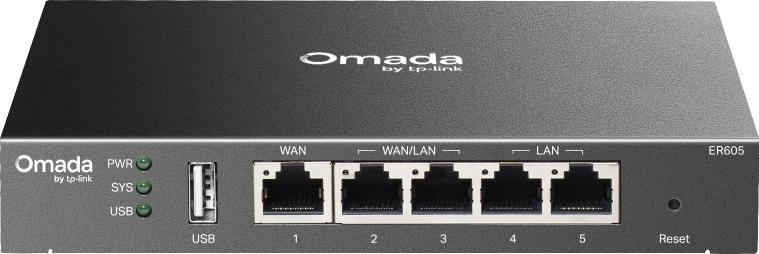
The ER605 (current hardware walk-up is the V2/V2.30 revision on TP-Link’s product page) is a wired-only Gigabit VPN gateway in the Omada SDN family. Five RJ45 ports total: one dedicated WAN, two LAN, and two WAN/LAN that can be reassigned, which means up to three internet circuits at once with load balancing across them — a genuinely rare feature at this price point. There’s also a USB 2.0 port that takes a 4G/LTE dongle as a backup WAN, and TP-Link publishes a modem compatibility list you should check before ordering hardware for failover.
Inside is 256 MB of DDR RAM and 128 MB of flash — modest on paper, but enough to run the full Omada feature set in controller mode: stateful ACLs, deep packet inspection (TP-Link claims identification of 2,788 application types), DNS proxy with DNSSEC/DoH/DoT, ARP inspection, IP-MAC binding and DoS defense. One detail installers need to internalize early: some features only exist in one management mode. Static and policy routing are listed for both, but RIP and OSPF are standalone-only on the spec sheet, while SD-WAN site meshing, voucher/SMS hotspot authentication and zero-touch provisioning require an Omada controller (hardware, software, or cloud). Know which mode you’re deploying before the customer asks for the feature that lives on the other side of the controller.
Verified Specifications
| Item | ER605 (official spec) |
|---|---|
| Ports | 1× Gigabit WAN, 2× Gigabit LAN, 2× Gigabit WAN/LAN, 1× USB 2.0 (LTE dongle) |
| Multi-WAN | Up to 3 WAN with intelligent load balance, link backup, application-optimized routing |
| VPN tunnels | 20× IPsec, 50× OpenVPN, 16× L2TP, 16× PPTP, plus WireGuard and GRE (GRE standalone-only) |
| IPsec throughput (measured, official) | ESP-SHA256-AES256: 250.94 Mbps; ESP-SHA1-AES256: 239.39 Mbps; SHA512: 53.57 Mbps |
| Other VPN throughput (official) | WireGuard 82.62 Mbps; OpenVPN 15.90 Mbps; L2TP-IPsec 143.60 Mbps; PPTP 49.83 Mbps (encrypted) |
| Throughput / sessions | ~940 Mbps NAT (both directions ~1,775 Mbps bidirectional); 150,000 concurrent sessions, 1,800 new sessions/sec; DPI at 944/940 Mbps TCP/UDP |
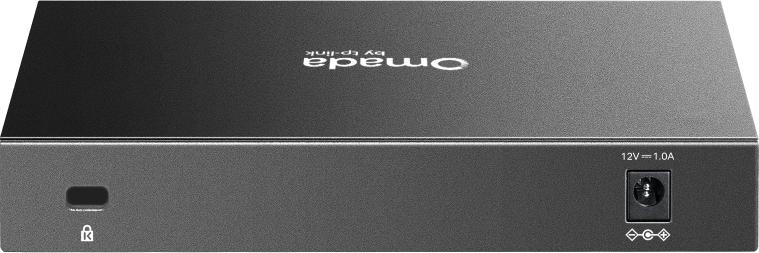
| Hardware | 256 MB DDR, 128 MB NAND flash, 12V/1A external adapter, max 7.94 W |
| Size / mount | 158 × 101 × 25 mm, desktop or wall-mount |
| Management | Standalone web UI + CLI, or Omada controller (cloud/hardware/software) with ZTP, alerts, captive portal |
How It Performs on Real Circuits
Here’s the honest installer math: the ER605 is a Gigabit-class gateway, so it tops out just under a wire-speed gigabit on plain NAT — around 940 Mbps up and down per TP-Link’s own numbers. That’s perfect behind a 500 Mbps or gigabit business fiber circuit. The number that bites people is encrypted throughput: ~250 Mbps on modern IPsec (SHA256/AES256), and OpenVPN drops to single digits past 15 Mbps. If the customer’s entire site rides one IPsec tunnel to HQ at full circuit speed, this is the wrong box — that’s an ER707-M2 or ER8411 job. But for the normal pattern — a fat local pipe plus a handful of site-to-site tunnels carrying VoIP, POS traffic and remote desktop — it never breaks a sweat, and DPI at 944 Mbps means reporting stays accurate even at full load.
Where It Fits in Real Installs
Multi-link small business. Cable plus fiber plus LTE backup is the classic three-WAN job, and the ER605 is the cheapest sane way to do it inside a managed stack. Application-optimized routing keeps voice on the low-latency line while bulk traffic rides the second circuit, and failover is timing- or detection-based per the spec.
Small branch offices. Twenty IPsec tunnels is plenty for a dozen-branch retail or clinic footprint, and one-click auto IPsec from the Omada controller makes branch turn-ups a fifteen-minute job. The voucher/SMS captive portal (controller mode) is handy for shops that need guest sign-in without a separate hotspot box.
Power users and homelabs. Small footprint, wall-mountable, under 8 watts, CLI in standalone mode — the prosumer crowd adopted this box years ago and it holds up, as long as they understand the OpenVPN ceiling before they wire a hundred remote workers into it.
Pros and Cons
Pros: three-WAN load balancing at an entry price; WireGuard support on a box this cheap; the full Omada SDN stack — ZTP, captive portal, DPI reporting — when you run a controller; wall-mountable and nearly silent at under 8 W; a huge per-tunnel-count VPN feature list; TP-Link’s Omada ecosystem means the switch and APs downstream are on the same dashboard.
Cons: encrypted throughput is the honest limit — OpenVPN at ~16 Mbps is remote-worker-count, not site-to-site bandwidth; features split between standalone and controller modes trips up installers (OSPF is standalone-only, SD-WAN is controller-only); the external power brick is another single point of failure in a rack-less install; no SFP+ uplink — this is all-copper; and RAM/flash are entry-level, so keep firmware current and don’t overload it with DPI rules on every VLAN.
Installer Notes From the Field
A few things I’d do differently on the first one I put up. First, assign your WAN/LAN ports in the controller before the tech shows up on site — reassigning a live port that carries a production circuit drops traffic for the length of a coffee break. Second, if you’re using the LTE backup, buy the modem from TP-Link’s published compatibility list, not whatever is on sale; the USB cell path is pickier than the wired side and a non-listed stick simply won’t authenticate as a WAN. Third, budget the controller up front if the site will ever have more than one Omada device: features like voucher hotspots, SD-WAN meshing, and zero-touch provisioning all silently assume a controller exists, and retrofitting one later means re-configuring the gateway from scratch in controller mode.
Bottom Line
The ER605 remains the best price-to-features gateway you can put at the edge of an Omada network, as long as you respect its ceiling: it’s a sub-gigabit NAT engine with a generous tunnel count, not a multi-gig encrypting router. For single-gig-or-slower circuits, three-WAN failover, and controller-managed branch fleets, it’s still the default recommendation in this class — nothing else in Omada gives you multi-WAN, WireGuard, and SD-WAN management in a wall-mount box this small. When you size above it, move up; when you size at it, it just works. If you want help sizing an Omada edge for a real site, get in touch.
Specifications and throughput figures from the official TP-Link Omada ER605 product page (omadanetworks.com / tp-link.com US). Product images are official TP-Link renders, white space trimmed for this post.