
Grandstream UCM6308 Review: The On-Prem PBX That Kills The Per-Seat License Fee
The first time I sized a PBX for a 200-seat distribution center, the owner asked me a question I have heard a dozen times since: “Why not just run everything off Grandstream’s big box instead of paying per-seat for a cloud phone system?” On paper, the Grandstream UCM6300 series — the UCM6301, UCM6302, UCM6304 and UCM6308 — is exactly that box. One platform for voice, video calling, conferencing, surveillance paging, and mobility, running on-site, with no per-user licensing. After several installs on the UCM6304 and UCM6308, here is what the spec sheet actually means in the field.
What the UCM6300 Series Actually Is
The UCM6300 line is Grandstream’s on-premises IP PBX family, built on Asterisk version 16. The platform unifies voice, video calls, web meetings, messaging, call queues, and even facility integrations through an open API. The headline numbers scale across four models, but every model shares the same DNA: zero-touch provisioning for Grandstream SIP endpoints, a built-in conferencing platform reachable from desktop, web, the Wave softphone app, and SIP handsets, plus SRTP/TLS encryption with secure boot, unique certificates, and random default passwords out of the box.
The ecosystem pieces matter as much as the box. GDMS (Grandstream Device Management System) is the free cloud layer for provisioning, monitoring, and firmware across sites, and UCM RemoteConnect adds always-on NAT traversal so remote workers and branch phones register cleanly without poking holes in the firewall. Wave covers Windows, macOS, Chrome, Firefox, Android, and iOS, and on the UCM6300 series it can place calls to extensions, landlines, and mobile numbers. That combination — on-prem control plus cloud convenience without per-seat fees — is the pitch, and it is a genuinely different economic model than most hosted VOIP platforms.
The Specs, Straight From The Datasheet
| UCM6301 | UCM6302 | UCM6304 | UCM6308 | |
|---|---|---|---|---|
| Max users | 500 | 1,000 | 2,000 | 3,000 |
| Concurrent calls (G.711) | 75 | 150 | 300 | 450 |
| Max concurrent SRTP calls | 50 | 100 | 200 | 300 |
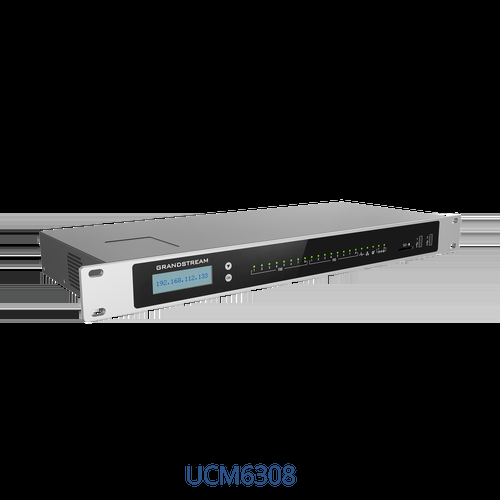
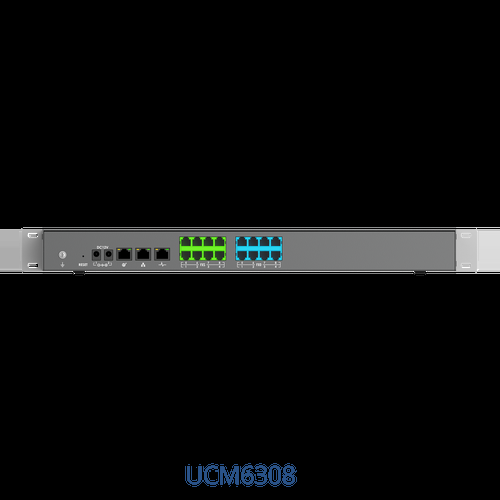
| Analog FXS ports | 1 | 2 | 4 | 8 |
| PSTN FXO ports | 1 | 2 | 4 | 8 |
| Meeting capacity | 4 rooms / 75 participants | 8 rooms / 150 participants | 15 rooms / 200 participants | 25 rooms / 300 participants |
| Network | 3x auto-sensing Gigabit RJ45 with PoE+, switch or router mode | |||
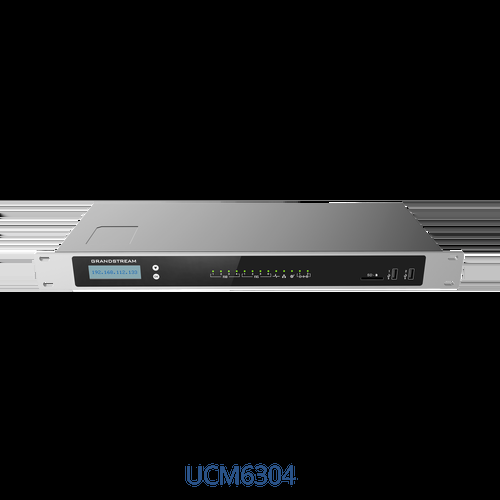
| peripherals | USB 3.0 + SD | USB 2.0 + USB 3.0 + SD | 2x USB 3.0 + SD | 2x USB 3.0 + SD |
| Display | 320×240 color LCD touch | 128×32 dot-matrix LCD with buttons | ||
| Mounting | Wall / desktop | Rack / desktop (1U-class chassis) | ||
Every model carries the same core engine: Opus full-band voice plus the usual G.711/G.722/G.729 stable, T.38 fax, H.265/H.264/VP8 video at up to nine video feeds per room, jitter resilience to 50% packet loss, 128 ms carrier-grade line echo cancellation, Layer 2/3 QoS, OpenVPN, and up to 64 layers of multi-language IVR. Hot Standby high-availability pairing is on the table, and all ports keep lifeline capability so analog phones and lines keep working through a power outage on UPS.
How It Installs In The Real World
The three Gigabit ports doing double duty as switch ports, router ports, or a mix is the detail that surprises people on day one. On a small site I have run a UCM6302 with one port to the ISP handoff in router mode, one to the access switch, and the third to a spare drop — no extra gateway needed on lean deployments. PoE+ on the RJ45 ports means a single PoE switch port powers the whole unit in switch-mode deployments.
The FXO/FXS lifeline is not a gimmick. Every installed site keeps at least one analog POTS line for 911 and emergency paging, and the lifeline routing means desk phones on FXS ports Ring through the copper when the PBX reboots or power drops. If you need more analog ports than the box has, Grandstream’s GXW gateways peer into the UCM and extend both FXS and FXO counts.
Zero-touch provisioning works the way marketing claims when the endpoints are Grandstream: phones boot, find the UCM over DHCP/mDNS/SIP SUBSCRIBE, and pull their config. Wave plus UCM RemoteConnect handles the remote-worker problem without opening SIP ports to the internet — the NAT traversal service runs on AWS with a 99% reliability target, and it registers happily to GDMS for one-pane-of-glass monitoring. The REST/AMI API is deep enough for CRM and PMS integrations; the hospitality integrations are a genuine reason hotels spec this line.
Pros And Cons
Pros:
- No licensing fees, no per-seat charges, no upgrade fees — the whole economic argument in one line.
- Scalable ladder from 500 to 3,000 users on one firmware family, so a growing shop keeps the same admin model.
- Built-in video conferencing (up to 9 video feeds per room) at a price cloud platforms charge monthly for.
- Free GDMS cloud management plus RemoteConnect NAT traversal; zero-touch on Grandstream endpoints.
- Secure boot, unique certificates, SRTP/TLS/802.1X/ZRTP, OpenVPN — the security sheet reads like an enterprise checklist.
- Lifeline FXS keeps phones alive through outages; FXO/FXS expandable via GXW gateway peering.
- Asterisk 16 underneath means a huge integration and community knowledge base.
Cons:
- Concurrent-call math is deceptive: a 3,000-user box tops out at 450 G.711 calls (300 SRTP), so plan trunks by busy-hour, not user count.
- The UCM6301’s single FXS/FXO pair is thin for any site with real analog needs — step up or peer a gateway.
- On-prem means you own uptime: firmware discipline, UPS, backup routes to emergency services.
- Video meet-up features assume good upstream bandwidth; jitter resilience helps, but it does not invent capacity.
Use Cases From The Install Side
Professional offices, 100–300 seats: A UCM6304 or UCM6302 sits in the IDF on a UPS, phones zero-touch provision via GDMS, Wave covers the hybrids who refuse a desk phone, and the built-in conferencing replaces a paid meeting platform. The licensing math pays for the hardware in months.
Hotels and multi-property groups: PMS API integration, multilingual IVR up to 64 layers, and lifeline FXS on every room corridor circuit make this the line I spec when housekeeping phones, lobby paging, and front-desk handsets all need to coexist.
Light-industrial and retail DCs: PoE+ powered in switch mode, DECT/Wi-Fi handsets from the same vendor, RemoteConnect keeping remote depots registered without firewall surgery.
Bottom Line
If your site supports 150-plus users, runs Grandstream handsets, and you would rather own your PBX than rent it, the UCM6300 series is the strongest value story in business telephony right now — and the 2,000-user UCM6304 is the sweet spot of the range. Under 50 users with no analog baggage, cloud is honestly easier; the UCM earns its rack space at scale, in hospitality, or anywhere licensing fees have started to snowball. Spec the concurrent-call ceiling, not the user count, keep a UPS under it, and let GDMS do the provisioning. That combination is why this box has quietly become my default on-prem recommendation.
Considering a UCM6300 deployment? Get in touch and I will size it against your busy-hour traffic and trunk counts.
Specifications sourced from Grandstream’s official UCM6300 series product page and datasheet (rev. 5.2026 v4). Product images courtesy of Grandstream.