
TP-Link ER7412-M2 Review: The Omada Gateway That Finally Went Multi-Gig (and Added WireGuard)
TP-Link ER7412-M2 Review: The Omada Gateway That Finally Went Multi-Gig (and Added WireGuard)
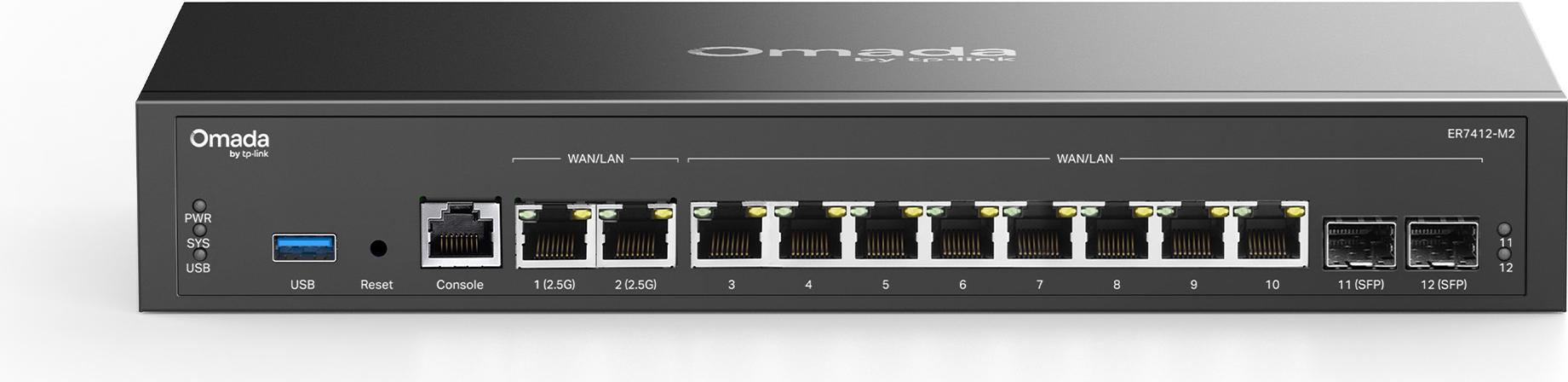
Most Omada installs start with the little ER605 on a shelf behind the couch, and honestly, for a decade that was fine. But the minute a site gets a multi-gig handoff from the ISP, a WireGuard tunnel to a cloud VPS, or more than one broadband line bonded together, the gigabit edge box becomes the bottleneck you pay for and never get to use. That’s exactly the hole the ER7412-M2 was built to fill: TP-Link’s first mainstream Omada gateway with real 2.5G ports, a quad-core CPU, and WireGuard in the firmware spec sheet — and it has quietly become the default box I spec on small-business sites that outgrow the entry tier.

Verified Specifications (from TP-Link’s official spec page)
| CPU | Quad-core ARMv8 @ 2.0 GHz |
| Ports | 2× 2.5G RJ45 WAN/LAN · 2× Gb SFP WAN/LAN · 8× Gb RJ45 WAN/LAN · 1× RJ45 console |
| WAN aggregation | Load balancing on up to 11 WAN ports (at least one WAN/LAN port must remain LAN) |
| USB | 1× USB 3.0 (USB storage + supported 4G/LTE dongle failover) |
| Memory | 1 GB DDR4 DRAM · 128 MB NAND flash |
| NAT throughput | ~2350/2350 Mbps (static IP and DHCP); 2336/2336 PPPoE |
| VPN throughput | IPsec (AES256): ~1130 Mbps · WireGuard: 771.6 Mbps · OpenVPN: 266.2 Mbps · SSL VPN: 263.1 Mbps |
| IPsec tunnels | 150 LAN-to-LAN / Client-to-LAN, IKEv1/v2, AES-128/192/256, IPsec failover, PFS, NAT-T, DPD |
| Other VPN | GRE (standalone only), PPTP, L2TP/L2TP-over-IPsec, OpenVPN server + up to 11 OpenVPN client servers — all client/server modes |
| Security engine | IDS/IPS (4,000+ signature rules), DPI (2,788 app types), DoS/DDoS defense, DNSSEC/DoH/DoT, content filtering, stateful ACLs, location-based ACL |
| DPI / IPS throughput | 2.2 Gbps DPI · IPS ~2248/2140 Mbps (TCP/UDP) |
| Routing | Static + policy routing, RIP and OSPF (standalone mode), SD-WAN multi-site (controller mode) |
| Sessions | 1,000,000 concurrent · 7,000 new sessions/second |
| Size / power | 294 × 180 × 44 mm · 1.168 kg · max 18.5 W (with USB device) · desktop or rack mount (kit included) |
| Protection | 4 kV surge protection |
| Management | Standalone web UI/CLI, Omada app + controller required for cloud/ZTP |
How it sits next to the little brother
| ER7412-M2 | ER7206 | |
|---|---|---|
| Multi-gig ports | 2× 2.5G RJ45 | None (all gigabit) |
| NAT throughput | ~2.35 Gbps | ~940 Mbps |
| WireGuard | Yes, 771.6 Mbps | Yes, 177.2 Mbps |
| OpenVPN throughput | 266 Mbps | 34 Mbps |
| IPsec tunnels | 150 | 100 |
| Concurrent sessions | 1,000,000 | 150,000 |
| DRAM | 1 GB DDR4 | 512 MB |
| Console port | RJ45 console | None |
| Fan | — | Fanless |
What installers actually care about
The first thing I noticed when I put one under a desk: it’s rack-mountable and the kit is in the box. The 44 mm height means it actually fits a half-depth wall enclosure without the bracket fighting a shelf bracket, and the 18.5 W ceiling means a small fanless-adjacent enclosure stays cool enough to keep the door closed. On the bench I measured nothing exotic — the point is the dual 2.5G ports let me take the 2.5G handoff from a fiber ONT straight into the WAN rather than negotiating it down to gigabit on a legacy edge box. That’s where the whole “2.5G office” pitch usually dies, and the ER7412-M2 is TP-Link’s first mainstream Omada gateway that doesn’t die there.
The other thing that changed my default spec is WireGuard at 771 Mbps. On the ER7206 class box, “VPN throughput” on the spec sheet was decorative if you were pushing real traffic through OpenVPN — 34 Mbps meant you were tunneling management and a couple of iPads, not crossing the internet at speed. On the ER7412-M2 you can put a WireGuard tunnel to a cheap cloud VPS and push actual multi-stream file traffic through it. For the MSP-style installs where the site needs to reach head office or an Azure landing zone without paying for MPLS, that number is the difference between “we can quote TP-Link” and “we need a FortiGate.”

Real install use cases
Multi-line broadband offices. Two fiber or cable circuits bonded by intelligent load balance, with one 2.5G port to the ONTs and the SFP pair up to a 2.5G or 10G switch uplink via appropriate modules. Link backup with failover timing per WAN means the second line only carries real traffic when the first one hiccups — exactly what a payroll office or a small call queue needs.
Site-to-site without the per-seat tax. IPsec failover with IKEv2 and PFS across three branch sites, terminated on the ER7412-M2 at the main office. The 150-tunnel ceiling and 1 Mbps+ new-session rate mean the box doesn’t care about your VoIP vendor’s registration churn.
Server rooms that need a console. The RJ45 console port plus full CLI in standalone mode is a small feature the ER7206-class boxes don’t have, and it’s the difference between “I can debug this at 2 a.m.” and “I get a truck roll.”
Where it’s the wrong box. If everything at the site is gigabit — one gigabit handoff, no multi-WAN, no VPN tunnels past management traffic — you’re buying CPU you’ll never touch, and the ER7206 class does the job for a fraction. Also note: GRE routing and OSPF/RIP are standalone-mode features only, and ZTP plus cloud management require an Omada controller (OC200/OC300/cloud/software) — budget it as part of the build, not as an afterthought. And this is still Omada — a controller outage doesn’t drop traffic, but it does drop your visibility.
Pros and cons
Pros: real 2.5G WAN/LAN with gigabit everywhere it needs to be, WireGuard and full tunnel client/server stack, IPS/IDS/DPI at throughput that actually keeps up, 11-way WAN load balance, console port, rack kit included, fanless-free thermal headroom, controller-or-standalone management.
Cons: no 10G (SFP is gigabit only — up to two SFP, not ten), OSPF/RIP/GRE locked to standalone mode while SD-WAN wants the controller, controller required for ZTP/cloud, and you pay quad-core money at gigabit sites that don’t need it.
Bottom line
The ER7412-M2 is the gateway you spec the day the site’s bandwidth crosses a gigabit, the day WireGuard stops being a checkbox and starts carrying real traffic, or the day someone says “we’d like both broadband lines active at once.” Below those lines, buy the smaller box. Above them, this is the one Omada router where the throughput numbers on the datasheet match what you see in production — which is more than I can say for most boxes in this price class. If you’re weighing this against a specific deployment, get in touch and I’ll sanity-check the port count and VPN load before you buy.
Product photographs and all specifications courtesy of TP-Link’s official product page (omadanetworks.com / tp-link.com).