
UniFi Cloud Gateway Fiber vs TP-Link Omada Fusion 2.5G: Two Micro Gateways, Two Very Different Bets
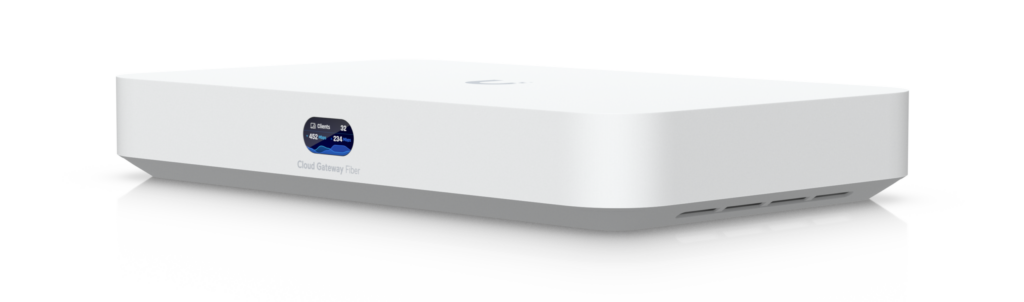
Two years ago, if you wanted a proper multi-gig gateway with a real application stack behind it, you were buying a rack-mount console the size of a biscuit tin and finding somewhere to put it. Now both Ubiquiti and TP-Link ship the whole idea in a box that disappears on a shelf — and they are betting on two very different things. Ubiquiti’s UniFi Cloud Gateway Fiber (UCG-Fiber) bets that the fiber handoff, the 10G edge, and self-hosted applications are where the network is going. TP-Link’s Omada Fusion 2.5G bets that the right move is to weld the controller to the router and make license-free cloud management the product.
As an integrator, I have deployed a bit of both ecosystems, and the truth is these boxes are not really competing for the same customer even though the marketing makes them look like twins on a spec sheet. This is the comparison I would give a client sitting across the desk from me: real numbers, real limitations, and the install scenarios where each one is actually the right call.
Ubiquiti UCG-Fiber at a Glance
The UCG-Fiber is Ubiquiti’s answer to a simple question: what if the fiber ONT handoff lived inside the gateway? Here is what the spec sheet says (and this is a spec sheet that reads far bigger than the box does):
- Processor / memory: Quad-core ARM Cortex-A73 at 2.2 GHz, 3 GB of system memory — this is a genuinely fast edge CPU, not a repurposed switch chip
- Ports: (1) 10G SFP+ plus (1) 10 GbE RJ45 as default WAN ports, a 4-port 2.5 GbE switch built in, and a second 10G SFP+ cage
- Routing performance: up to 5 Gbps IDS/IPS throughput, Layer 7 DPI, zone-based firewall with content filtering and ad blocking, OSPF and BGP dynamic routing, Advanced NAT (SNAT/DNAT/masquerade/NAT pooling/1:1 NAT), and an integrated RADIUS server with RadSec support
- SD-WAN without the enterprise tax: license-free SD-WAN with Site Magic site-to-site, plus a full VPN toolkit on both ends — WireGuard, OpenVPN, IPSec, L2TP, Teleport zero-config VPN, and Identity one-click VPN
- The NVR trick: selectable NVMe storage up to 2 TB running UniFi Protect locally — this box is a gateway, a controller, and a camera recorder at the same time (rated for 50+ managed devices; roughly 15 HD / 8 2K / 5 4K camera tiers, 50 UniFi Access hubs, 500+ simultaneous users)
- Power and physical: 30W PoE budget for a couple of cameras right off the gateway, 54V DC adapter included, fanless-friendly desktop form factor, and NDAA compliant
The architecture matters more than any single line item. UniFi’s model is one console runs everything: Network adoption, Protect recording, Access, Talk, and Connect all live on the same box — which is why Ubiquiti put 3 GB of RAM and a quad-core A73 in a desktop gateway that some competitors still sell as a pure router. On top of it, CyberSecure subscription adds 55,000+ IDS/IPS signature sets and cloud threat features when you want them. The Cloud Key-style management you used to hang off a switch is now the gateway itself.
TP-Link Omada Fusion 2.5G at a Glance
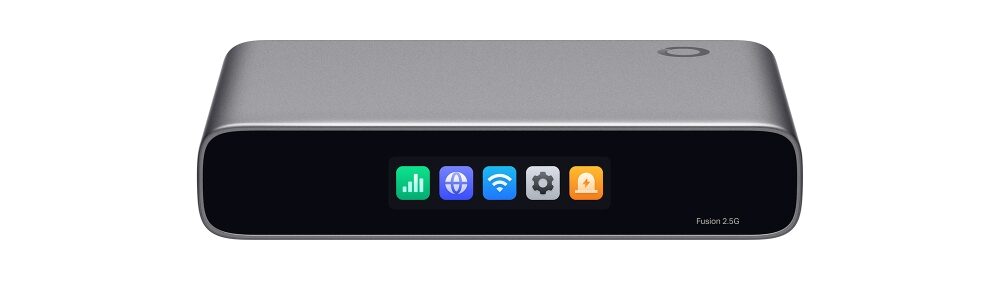
Fusion is TP-Link’s response to cloud management without the cloud license fee — the controller software is literally built into the gateway, so there is no OC200/OC300 hardware key to buy, no self-hosted Java container to babysit, and no per-device subscription. What you get for roughly $170:
- Processor / memory: quad-core CPU with 2 GB DDR4 — smaller than Ubiquiti’s silicon, and you’ll feel the difference under IPS load
- Ports: 5x 2.5 GbE RJ45 total — one dedicated WAN, four switchable LAN/WAN — so with three WAN uplinks still loaded you are running the LAN on the last 2.5G port
- Routing performance: roughly 2.1 Gbps-class IDS/IPS throughput in TP-Link’s marketing; independent lab testing measured ~2,360 Mbps NAT and 2,183 Mbps with IPS/IDS enabled, 150,000 concurrent sessions, and about 1 Gbps site-to-site on IPsec
- Management: license-free cloud management out of the box, Bluetooth provisioning (adoption from the Omada app in minutes with batch adoption of all devices), a 2.51-inch on-device touchscreen for live diagnostics, app-based ACLs, one-click Auto QoS, content filtering and ad blocking
- SD-WAN: full-mesh SD-WAN with up to 20 sites, direct inter-site links — the headline SMB feature
- Physical: 160 x 130 x 31.5 mm, fully fanless, USB-C power (5V/3A, under 9W draw), desktop/wall-mount (magnetic plate) and rack options — mount kits sold separately
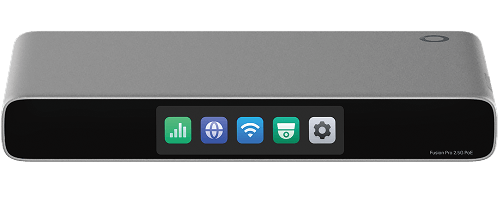
Worth noting for buyers who clicked on the wrong link: Fusion is a three-model line — the plain Fusion 2.5G (the one above), the Fusion G+ (gigabit LAN ports, no touchscreen), and the Fusion 2.5G PoE (8x 2.5G PoE+ ports, 110W budget, fan, bigger touchscreen). The PoE version is the one to quote if cameras or APs need to hang off the gateway itself.
The Spec Sheet, Side by Side
| Ubiquiti UCG-Fiber | TP-Link Omada Fusion 2.5G | |
|---|---|---|
| CPU | Quad-core ARM Cortex-A73 @ 2.2 GHz | Quad-core (unspecified ARM) |
| Memory | 3 GB | 2 GB DDR4 |
| WAN | (1) 10G SFP+ + (1) 10 GbE RJ45 (default), up to 6 WANs | (1) dedicated 2.5 GbE RJ45 |
| LAN / switchable | 4x 2.5 GbE + 2nd 10G SFP+ (10G/1G) | 4x 2.5 GbE LAN/WAN (up to 4 WAN total) |
| IDS/IPS throughput | 5 Gbps | ~2.1 Gbps-class (~2.18 Gbps measured; ~2.36 NAT) |
| Dynamic routing | OSPF + BGP | Static/policy routing, no BGP/OSPF at this tier |
| SD-WAN | License-free SD-WAN, Site Magic site-to-site | Full-mesh SD-WAN, up to 20 sites |
| VPN tunnels | WireGuard, OpenVPN, IPSec, L2TP client+server; Teleport, one-click Identity VPN | LightLink one-click VPN, IPsec (~1 Gbps measured site-to-site), OpenVPN |
| Security | L7 app-aware firewall, DPI, zone firewall, content filtering + ad blocking, integrated RADIUS (+RadSec), 55k+ IPS signatures via CyberSecure subscription | App-based ACLs, DPI, content filtering + ad blocking, one-click Auto QoS |
| Integrated server roles | UniFi Network + Protect NVR (NVMe bay up to 2 TB), Access, Talk, Connect; 50+ devices, 500+ users | Built-in Omada controller; ~30 devices / 300 clients supported |
| PoE | 30 W PoE budget on the gateway | None (Fusion 2.5G PoE model: 8x 2.5G PoE+, 110 W) |
| On-device UI | 0.96″ status display | 2.51″ color touchscreen w/ live diagnostics |
| Management | UniFi console/self-hosted/cloud; single pane across UniFi stack | License-free Omada cloud + Bluetooth provisioning |
| Power | 54V DC adapter (29.4 W excl. PoE) | USB-C 5V/3A (<9 W total) |
| Form factor | 212.8 x 127.6 x 30 mm, polycarbonate desktop | 160 x 130 x 31.5 mm, fanless; wall/rack mounts sold separately |
| Street price | ~$279 (storage tier by SKU) | ~$170 |
Fusion numbers from TP-Link marketing and independent measured results (lazyadmin.nl); UBNT numbers from official techspecs.ui.com. Both vendors caveat real-world throughput by features enabled.
Head-to-Head: Where Each One Actually Wins
Raw routing power: Ubiquiti, by a real margin
5 Gbps versus roughly 2.1-2.4 Gbps with security features enabled. If your internet circuit is a gigabit, you will never feel the difference. If you have a 2.5G or multi-gig fiber circuit — or a future one in budget — the UCG-Fiber keeps IPS/IDS switched on at full line rate and the Fusion starts becoming the bottleneck. Same story on concurrent sessions and dynamic routing: OSPF, BGP, RadSec, and NAT pooling are UniFi features; Omada has solid static and policy routing but the enterprise dynamic routing table is thinner.
Port economics: TP-Link, if you are building a switch-free closet
Five fully-switched 2.5G ports with four WAN-configurable is genuinely clever for tiny offices that don’t want a switch at all — WAN1 plus three failover links with a single switch port feeding the LAN. But Ubiquiti’s port set is 10G at the edge (SFP+ WAN, 10GBASE-T fallback, a second SFP+ for aggregation or an ISG-style inline segment) with 2.5G for the LAN drop. If you already have multi-gig switches, Ubiquiti’s layout is the right shape; the Fusion’s strength is being the entire wiring closet for a three-person dental office.
Management and day-2 operations: TP-Link wins for zero-ops, Ubiquiti for depth
Fusion’s Bluetooth adoption and on-device touchscreen are legitimately great for installers — commission a site from your phone in a closet with no laptop, and walk a client through their own network on the touchscreen. The license-free cloud is a real cost line: Omada cloud used to need hardware keys or self-hosting, and TP-Link is undercutting on exactly that. UniFi management is deeper: application-level policies per device group, Identity as a full RADIUS/user DB, Protect events tied to firewall zones, Site Magic SD-WAN with visual overlays. It assumes you’ll log in and configure things; Fusion assumes you mostly won’t.
The differentiators neither spec sheet headline admits
- UCG-Fiber runs Protect. If you want cameras on the box, that is a 2 TB NVMe bay and a self-hosted NVR with AI detections — a feature TP-Link’s VAG/Sentinel line handles, but not the Fusion gateway itself. Ubiquiti is selling one box that is router + controller + NVR + access controller.
- Fusion has no fan. In a wall closet next to clients, silence is a selling point. Ubiquiti’s fan design is quiet but not zero.
- Power. PoE on the UCG-Fiber (30W) will run a camera or two off the gateway itself; base Fusion doesn’t do PoE at all (that’s the PoE model). On the other hand, the UCG-Fiber is a 54V adapter brick in a world that was mostly done with power bricks.
- Voice: Ubiquiti Talk telephony works on the UCG; Fusion has no telephony story as of this writing.
Use Case One: The Fiber-First Home or MTU (My Default Is Ubiquiti)
Fiber handoff (ONT with SFP+ or the UCG-Fiber’s own fiber-side SFP+ WAN), multi-gig LAN, a handful of cameras, maybe a UniFi phone, a home office that VPNs out with WireGuard — this is Ubiquiti’s home turf and the UCG-Fiber is the only box in this comparison that can be the gateway and the NVR. A single Ubiquiti console replaces a Cloud Key, a mini NVR box, and a power brick for the doorbell/phone system. When a client asks me to keep it simple and consolidate into one box while keeping 10G growth room, the UCG-Fiber is what goes on the quote. Practical install notes: budget the NVMe storage at Protect camera count from day one (UBNT publishes per-camera/day retention math — get it right at quote, not at go-live), and remember the 30W PoE budget runs roughly one 4K cam or one access point before it is done — it is a convenience port, not a switch replacement.
Use Case Two: The Multi-Site SMB Spoke (Home Turf for Fusion)
Fifteen retail stores or clinic locations with fiber/cable combos at each site, no on-site IT, no rack space, no appetite for monthly management fees on a $300 device. This is exactly what Fusion was aimed at: Bluetooth adoption gets a tech in and out in under an hour, the touchscreen handles “is the internet up?” questions without opening an app, full-mesh SD-WAN links the sites with per-policy failover, and the free cloud controller keeps HQ visibility without licensing per device. Ubiquiti can do all of this through UISP/UniFi cloud and Site Magic, but the TCO math on a 5-20 site all-Tp-Link or mixed fleet lands in TP-Link’s favor for many SMB clients — as long as nobody on the design team needs BGP. Practical install notes: the magnetic mount plate and rack kit are optional purchase items on the Fusion — order them with the quotes, not after. And test failover on all WAN combinations before handover; dual-fiber plus LTE failover chains behave differently depending on subnet design, and the touchscreen makes field troubleshooting visible to the client, which goes a long way in the trust department.
Use Case Three: Mixed Fleets Are the Real World
The honest integrator’s answer: a lot of my clients want UniFi WiFi/Protect and are perfectly fine with an Omada edge (and vice versa). UniFi has ONVIF support and TP-Link devices speak standard VPN protocols, so a UCG-Fiber + UniFi AP/Protect site can terminate IPsec/WireGuard tunnels with an Omada fleet across the WAN. What does not work: adoption. UCG-Fiber cannot adopt Omada devices and Fusion cannot adopt UniFi devices, so a mixed shop means two management planes — and if the client wants single pane of glass, that answers the question at the start of the project.
VPN and Remote Access Detail
Both boxes do site-to-site and client VPN, but the toolkits are different in kind. Ubiquiti ships every tunnel type you would name — WireGuard, OpenVPN, IPSec, L2TP — on both sides (server and client), plus the party tricks that save installer hours: Teleport spins a VPN between two UniFi sites with two clicks, Site Magic does the same for SD-WAN policies, and Identity one-click VPN hands remote users a single button. The integrated RADIUS server (with RadSec) matters when Wi-Fi enterprise auth lives at the edge — nothing else in this price class does it natively.
TP-Link’s LightLink VPN is the equivalent single-click story for Fusion: smart split tunneling decides what rides the tunnel, keeping latency-sensitive traffic on the local internet. IPsec site-to-site is measured around 1 Gbps on the Fusion 2.5G — which is still more tunnel throughput than most SMB circuits ever fill, and there’s OpenVPN for client connections. The difference is ceiling: if one day a client needs BGP peering on the gateway or dynamic routing protocol support, UniFi says yes and Omada at this tier says “static routes, thanks.”
On security posture: both do DPI, layer-7 app ACLs, content filtering and ad blocking. UniFi’s edge is signature volume (CyberSecure subscription layers 55,000+ IPS signatures and cloud threat intel when enabled) and zone-based firewall granularity. TP-Link’s edge is that Auto QoS and app-based policies are one-click — deliberately built for the owner-operator who is not going to read a firewall manual.
Bottom Line
Buy the UCG-Fiber when: the site is UniFi-native or UniFi-leaning; fiber/multigig throughput is real; you want cameras, access, and telephony on the same box; or the client’s IT staff lives inside one controller and wants the depth (RADIUS, dynamic routing, app-level policies). You’re paying for a quad-core application host, not just a router.
Buy the Omada Fusion 2.5G when: the site is small, switch-free or PoE-switch-free (the PoE model for the latter), operations-thin on staffing, and the value is zero-config cloud plus the touchscreen. It’s the best $170 cloud-managed 2.5G edge I can spec this year for a small multi-WAN site, and the no-license business model is a genuine reason to standardize on it across a distributed SMB fleet.
They’re both excellent boxes pointed at different problems. Put both in the proposal if a client is truly ecosystem-agnostic — but read the spec sheet honestly and put the right one first.
If you’re weighing these options for a deployment and want the install to be done right the first time, reach out and let’s talk.
Sources: Ubiquiti techspecs.ui.com and store.ui.com for UCG-Fiber; omadanetworks.com and TP-Link datasheet for the Omada Fusion 2.5G family; independent lab throughput figures via lazyadmin.nl review of the Fusion 2.5G (June 2026). Product images are courtesy of Ubiquiti Networks and TP-Link Systems and are used under editorial fair use.
