
Synology DS1525+ Review: The 5-Bay Plus NAS That Earns Its ECC Memory
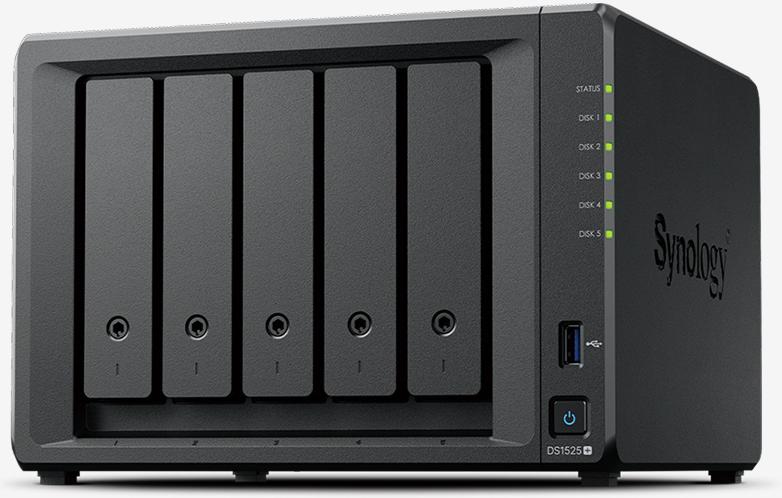
The DS1525+ is Synology’s five-bay Plus-series NAS, and it sits in the exact spot most of my small-business jobs actually live in: too much data for a four-bay to feel comfortable, not enough budget for an eight-bay. Five bays, ECC memory standard, dual 2.5GbE out of the box, and two M.2 NVMe slots that don’t eat drive bays — that’s the short version. The longer version is why I keep speccing this box instead of the DS925+ next to it.
What the DS1525+ actually is
The DS1525+ is a desktop-form-factor DiskStation running DSM 7 with a quad-core AMD Ryzen V1500B and — importantly for this class — 8 GB of DDR4 ECC memory on board with a second SODIMM slot for expansion to 32 GB. That’s a step up in data integrity from the value-line “neo+” sibling, which ships with non-ECC memory at half the capacity. If you’re running virtual machines, containers, or Surveillance Station with meaningful camera counts, that ECC matters.
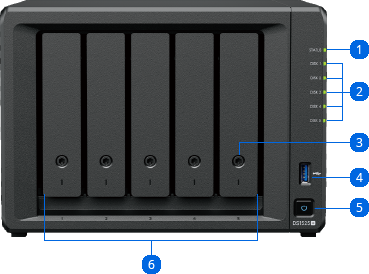
Storage is five SATA bays (3.5″ HDD or 2.5″ SSD) plus two M.2 2280 NVMe slots. Synology rates the box for both SSD caching and SSD storage pools on the M.2 slots — I’ve been building these as all-flash pools with the spinning bays for archive, and the two-tier approach within a single compact chassis is exactly what a 15-user office needs.
Verified specifications (Synology official spec sheet)
| Item | DS1525+ |
|---|---|
| CPU | AMD Ryzen V1500B, 4 cores / 8 threads, 2.2 GHz, hardware encryption engine |
| Memory | 8 GB DDR4 ECC SODIMM, 2 slots, max 32 GB (16 GB × 2) |
| Drive bays | 5 × 3.5″ SATA HDD or 2.5″ SATA SSD + 2 × M.2 2280 NVMe SSD |
| Max bays with expansion | 15 (DX525 × 2) — up to 360 TB raw with 24 TB drives |
| Network | 2 × RJ-45 2.5GbE; 10GbE via E10G22-T1-Mini upgrade module (sold separately) |
| Throughput (Synology lab) | Over 1,181 / 1,180 MB/s sequential read/write (10GbE) |
| PCIe | 1 × Gen3 x2 network upgrade slot |
| Expansion ports | 2 × USB Type-C (for DX525 units); 2 × USB 3.2 Gen 1 |
| File system | Btrfs / ext4 internal; snapshots up to 4,096 per system |
| Max single volume | 200 TB (with 32 GB memory installed) |
| Fans / noise | 2 × 92 mm, hot-swap capable, 22.60 dB(A) idle |
| Size / weight | 166 × 230 × 223 mm, 2.67 kg, 120 W external adapter |
| Warranty | 3 years, extendable to 5 with Extended Warranty Plus |
DS1525+ against its siblings
People ask why not just buy the DS925+ and save a bay’s worth of money, or stretch to the DS1825+. Here’s how the current Plus line reads on paper:
| Feature | DS925+ (4-bay) | DS1525+ (5-bay) | DS1825+ (8-bay) |
|---|---|---|---|
| CPU | AMD Ryzen V1500B, 4c/8t | AMD Ryzen V1500B, 4c/8t | AMD Ryzen V1500B, 4c/8t |
| Memory | DDR4 ECC, expandable | 8 GB DDR4 ECC, max 32 GB | 8 GB DDR4 ECC, max 32 GB |
| M.2 NVMe slots | 2 | 2 | 2 |
| Expansion | DX525 × 2 → 14 bays max | DX525 × 2 → 15 bays max | DX525 × 2 → 18 bays max |
| Networking | Dual 2.5GbE | Dual 2.5GbE | Dual 2.5GbE |
| Footprint | Small tower | 166 × 230 × 223 mm — smallest of the three | 166 × 343 × 243 mm |
Translation: same CPU across the line, so the decision is purely about bay count, desk space, and expansion runway. The 1525+ is the sweet spot when a four-bay fills in year two but eight shelves of drive sound ridiculous for nine people.
Where I’d install this box
Small-office file and backup target. A 10–20 person office with mixed CAD, video, or medical images. Five bays of HAT5300-class drives in SHR-2, two Enterprise M.2s as read-write cache, bonded 2.5GbE with LACP to the switch. Synology rates Surveillance Station for up to 40 cameras on this platform, which makes it a plausible NVR-and-file-server combo for a contractor’s yard office.
Edge server for a multi-site shop. The USB Type-C expansion ports take the DX525 if the archive grows; until then the second bay pair stays warm spare. Btrfs snapshots plus Snapshot Replication to a sibling box at another site gives you a 4,096-snapshot-per-system rollback history without a second site’s worth of hardware.
Virtualization-lite. ECC memory and the option to fill to 32 GB means a handful of VMs in VMM run honestly here. One installer note: the 200 TB single-volume limit assumes the full 32 GB — if you order the base 8 GB and plan big volumes, budget the RAM first, drives second.
Creative shop working archive. Photographers and video editors doing direct-to-NAS work live inside the 1,180 MB/s envelope when the M.2 pool fronts the array, and the five physical bays mean a SHR-2 pool survives a double drive failure — the exact scenario that ends a four-bay RAID-5 array on a Friday afternoon.
Installer notes
- The 2.5GbE links only pay off end-to-end — if the switch port is 1GbE the whole path is 1GbE. Budget an E10G22-T1-Mini module or a multigig switch in the same quote.
- M.2 caching is only guaranteed on Synology-validated drives (SNV3400/SNV5400 and friends). I spec Synology or SeSAT-validated drives exclusively on client installs; the warranty language is explicit.
- The Gen3 x2 network slot is a x4-physical/x2-electrical style upgrade path — Synology’s own module is the supported one, don’t wing third-party NICs on this platform.
- Two 92 mm fans and a 22.6 dB(A) idle number mean this is genuinely office-desk friendly; the eight-bay DS1825+ is twice the cabinet.
Pros and cons
Pros:
- ECC memory standard at 8 GB with a path to 32 GB — rare in this price class
- Two M.2 NVMe slots that serve cache and storage without occupying bays
- Dual 2.5GbE standard with a supported 10GbE upgrade module
- Clean expansion runway to 15 bays with DX525 units
- Genuinely quiet — 22.6 dB(A) idle is library-quiet territory
Cons:
- Same Ryzen V1500B as the entry models — no CPU premium for the Plus line
- 10GbE is extra (module sold separately), as are drives and the DX525
- External 120 W power brick — one more thing in the rack shelf
- Synology-validated memory/drives are strongly pushed; third-party parts void warranty support in DSM’s eyes
Bottom line
The DS1525+ is the five-bay grown-up: the same proven Ryzen platform and DSM data tools as the rest of the Plus line, ECC memory that the value line won’t give you, and a footprint that fits under a monitor arm instead of in a closet. If you need more than four drives and less than eight, buy it, put Synology NVMe in the M.2 slots, and call it done. If you’re already past fifteen terabytes of live data, walk to the DS1825+ instead — the bays will save you an expansion purchase later. Questions about a specific build? Get in touch.
Product specifications and performance figures sourced from Synology’s official DS1525+ product page at synology.com; product imagery courtesy of Synology Inc.
