
Synology RS1226+ Review: The 2U Rack NAS That Finally Made ECC Standard at This Tier
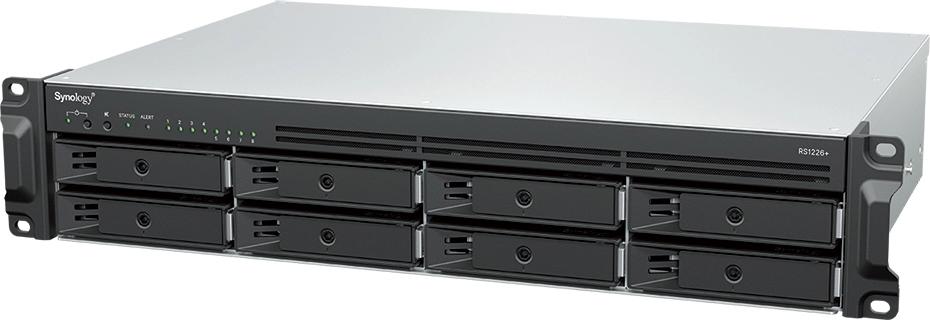
Most small-server rooms have that one box that quietly does everything: the file server, the backup target, the surveillance recorder, the VM host nobody planned for. Synology’s RackStation RS1226+ is the newest generation of that box in a 2U rack format — eight bays, ECC memory as standard, dual 2.5GbE, and a PCIe slot when you decide 2.5G wasn’t enough. I’ve specced enough Plus-series Synology gear into real installs to know what this platform does well and where it makes you work. Here’s the full rundown, straight from Synology’s official specifications.
The specs that matter (all verified from Synology)
| Spec | RS1226+ | RS1226RP+ |
|---|---|---|
| CPU | AMD Ryzen V1500B, 4 cores / 8 threads, 2.2 GHz, 64-bit, hardware encryption engine | |
| Memory | 4 GB DDR4 ECC SODIMM ×1, two slots, max 32 GB (16 GB ×2) | |
| Drive bays | 8 × 3.5″ SATA / 2.5″ SATA (hot-swap) + 2 × M.2 2280 NVMe (cache) | |
| Max bays w/ expansion | 12 with one RX426 expansion unit (up to 288 TB raw on 24 TB drives) | |
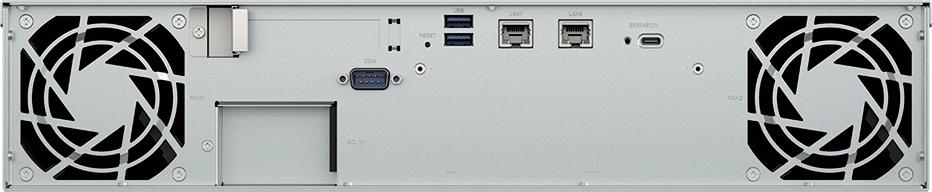
| Network | 2 × 2.5GbE RJ-45, link aggregation / failover | |
| PCIe expansion | 1 × Gen3 x8 slot (x4 link) | |
| Other ports | 2 × USB 3.2 Gen 1, 1 × USB Type-C expansion port, console port | |
| Form factor | 2U, 88 × 482 × 306.6 mm, 6.8 kg | 2U, 88.3 × 481.9 × 398.4 mm, 8.9 kg |
| Power | 250 W adapter, 72.33 W access / 20.74 W hibernation | 550 W PSU, 81.82 W access / 30.58 W hibernation |
| Redundant PSU | No | Yes |
| Noise | 23.3 dB(A) | 22.8 dB(A) |
| Rails | 4-post (RKS-02/RKM114) or 2-post direct mount | 4-post (RKS-02); rails sold separately |
Performance figures straight from Synology: over 2,300 MB/s sequential read and 1,500 MB/s sequential write with the dual 2.5GbE bonded — numbers that sound impossible until you remember the two M.2 NVMe slots are sitting right there feeding the cache tier. Synology’s Surveillance Station supports this box up to a recommended 40 IP cameras at 1080p (two licenses included), and DSM brings Active Backup for Business for Windows, Mac, Linux endpoints plus VMware and Hyper-V VMs with no per-client licensing.
Why the RS1226+ earns rack space
The honest pitch for this box is consolidation. One 2U chassis running DSM handles file services with granular permissions and audit trails, multi-site sync (including Hybrid Share cloud tiering), endpoint and VM backup, snapshots with immutability for ransomware resistance, and yes, the Office Suite and MailPlus collaboration stuff marketing loves. For a two-or-three-site MSP, the Central Management System lets you push group policies and batch updates across the whole Synology fleet from one console.
ECC memory standard on a 4-core Ryzen V1500B is the quiet headline. ZFS shops will point out Synology’s Btrfs-only approach on this model, and they’re not wrong to — but for backup targets and file shares where data integrity comes from snapshot schedules and immutability rather than self-healing pools, ECC-on-board at this price point removes the usual RAM-is-the-weak-link argument.
Where you’d actually deploy it
The distributed file server. Branch office of 15-40 people, main office runs the big iron. The RS1226+ takes an all-flash pool or spinning-plates-plus-NVMe-cache, bonds both 2.5G ports to the branch switch, and syncs shares back to the parentsite. Shallower depth on the non-RP model is a real-world win: 306.6 mm clears the uprights on wall-mount and half-depth racks where the RP+ at 398.4 mm gets tight. Cable management space matters more than spec sheets admit.
The backup target. Active Backup for Business against the eight bays, immutable snapshots on a schedule, replication out to a second Synology or C2. With one RX426 expansion you’re at twelve bays and up to 288 TB raw — enough for years of Version retention on a dozen endpoints and a handful of VMs without pruning.
The small-site surveillance recorder. Forty cameras at 1080p is the rated ceiling, and it’s fine at that as long as you keep cameras on their own VLAN and don’t mix heavy surveillance write streams with NFS datastores on the same bonded pair. This is squarely an SMB-class recorder — enterprise campuses want bigger platforms.
Installer notes from the field
Three things I’d do differently than the box-out default. First, populate both memory slots before deployment — Synology requires matched modules for dual-channel configs, and populating to 16 GB now costs a fraction of what a truck roll costs later, especially if you plan to run SSD cache volumes that eat RAM for breakfast. Second, bond both 2.5GbE ports from day one even if the site switch only has one free multigig port right now — active/passive failover costs you nothing and the LACP config in DSM survives the eventual switch upgrade. Third, use the M.2 slots for read-write cache with Synology-verified NVMe drives only. The compatibility list exists for a reason: unverified drives throw amber health warnings that turn a quiet deployment into warranty paperwork.
On the power side, the plain RS1226+’s external 250 W adapter is fine for a single-circuit closet but ugly in a managed rack. If the site has dual-circuit power or any hopes of true power redundancy, the RS1226RP+ with its internal 550 W redundant PSU is the version that lets you sleep — just measure your rack depth first, because that extra 90 mm of depth is real.
Pros and cons
One more field note: snapshot schedules. Immutability is the feature that separates a real backup strategy from a folder copy. Set the scheduler before the first terabyte lands — retention that starts on day one costs nothing, and retrofitting it after a ransomware scare never works the way people hope.
Pros:
- ECC memory standard — unusual at this tier and the first thing I check on any backup box.
- True 10G headroom later via the PCIe Gen3 x8 (x4 link) slot; the 2.5G pair gets you by until then.
- M.2 NVMe cache slots built in — no PCIe slot sacrificed, and the tiering actually shows in small-file throughput.
- DSM’s backup suite (Active Backup for Business, Hyper Backup, immutable snapshots) is license-free for endpoints and VMs — the total cost story beats most competitors.
- Active/passive Synology High Availability pairing with a second unit, no extra software cost.
- RP+ variant adds redundant 550 W power for sites that genuinely need it.
Cons:
- No 10GbE out of the box — the NIC comes out of the pocketbook via the PCIe slot (check Synology’s NIC compatibility list, not just any card).
- Rails sold separately. Budget the RKS-02/RKM114 per unit on the quote before the client asks why the rack looks bare.
- Btrfs only — if the shop standard is ZFS, this isn’t that box.
- Non-RP model uses an external 250 W power adapter — one more brick in the rack and one more single point of failure.
- Ryzen V1500B is a proven part, not a speed king; heavy VM workloads on top of backup duty will want the headroom of bigger siblings.
Bottom line
The RS1226+ is the rack version of the Synology formula I keep recommending to integrators: enough horsepower, ECC where it counts, licensing that doesn’t punish growth, and an expansion path that doesn’t require a forklift upgrade. Pick the plain RS1226+ for shallow racks and single-homer sites; pay up for the RS1226RP+ the moment a redundant PSU matters more than rack depth, because that’s the only meaningful difference between them. Either way, spend the savings on the add-on 10GbE card and Synology-verified drives — that’s where this platform shows its speed.
Specs pulled straight from the box — if your install picture looks like any of these scenarios, reach out and I’ll help you size it right.
Product specifications and product imagery sourced from Synology’s official product page for the RackStation RS1226+/RS1226RP+ (synology.com). Performance figures are Synology’s internal testing.
