
Ubiquiti Dream Machine Pro Max Review: The $599 Gateway That Replaced My Default

Why the Dream Machine Pro Max Earns Its Rack Slot
The Dream Machine Pro Max has quietly become the box I default to whenever a UniFi site crosses a certain size threshold — and for a lot of shops, that threshold is lower than they think. Ubiquiti built it on the same platform as the beloved UDM Pro, then doubled the memory, doubled the NVR bays, added a 2.5 GbE port, and pushed IDS/IPS throughput from 3.5 to 5 Gbps. If you spec the Pro Max instead of the Pro on every job that touches 150 devices, you will almost never have to come back. That is the entire philosophy of this box in one sentence, and it is why it has earned its rack slot in my standard bill of materials. This is not a review of “is UniFi good” — you already decided that when you bought the APs. This is about whether the Max tier of the Dream Machine line makes installer sense in 2026, what it actually gives you over the standard Pro, and where it falls down.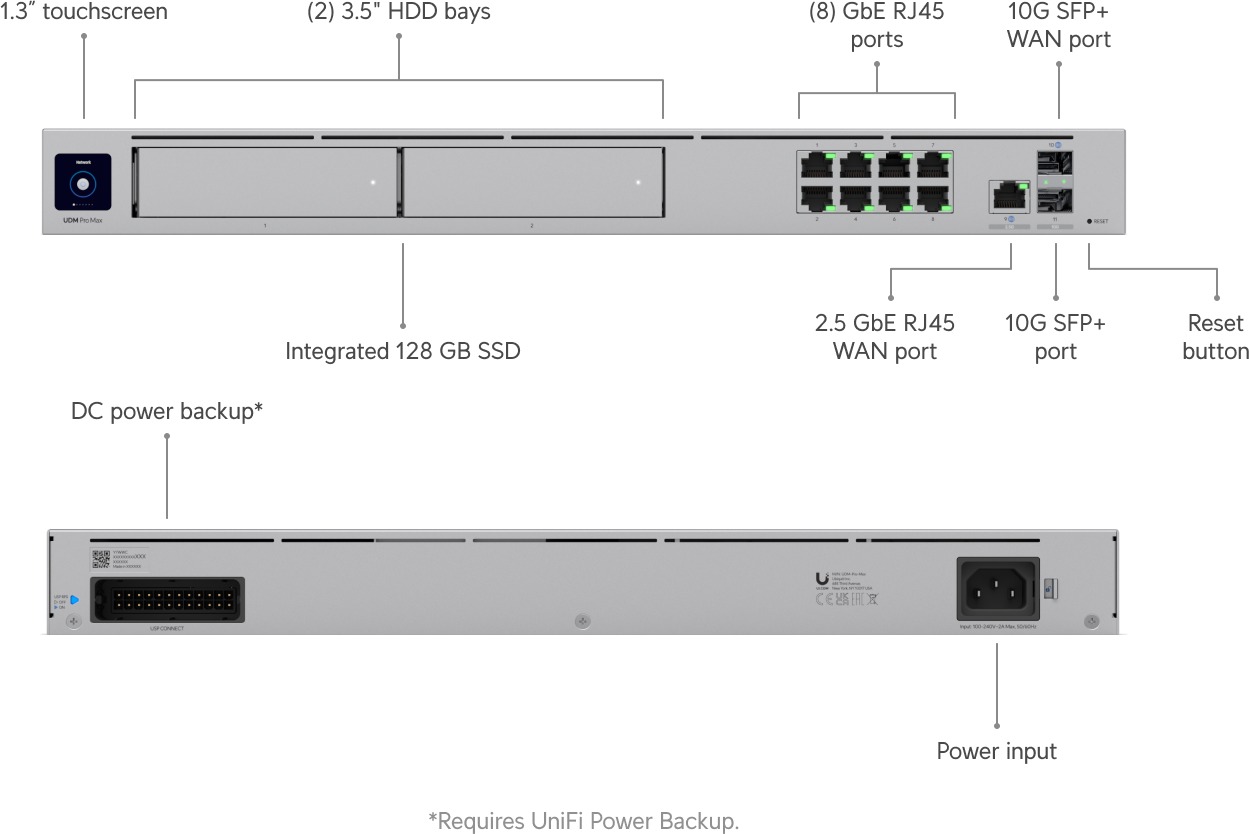
Verified Specifications
Everything below comes straight from Ubiquiti’s official tech specs page for the UDM-Pro-Max — no guesses, no forum folklore.| Spec | UDM Pro Max | UDM Pro (for comparison) |
|---|---|---|
| Price (US store) | $599 | $379 |
| Processor | Quad-core ARM Cortex-A57 @ 2.0 GHz | Quad-core ARM Cortex-A57 @ 1.7 GHz |
| System memory | 8 GB | 4 GB |
| Managed UniFi devices | 200+ | 100+ |
| Simultaneous users | 2,000+ | 1,000+ |
| IDS/IPS throughput | 5 Gbps | 3.5 Gbps |
| NVR storage | 2x 3.5″ bays + 128 GB onboard SSD | 1x 3.5″ bay |
| Ports | 8x GbE RJ45, 1x 2.5 GbE RJ45, 2x 10G SFP+ | 9x GbE RJ45, 2x 10G SFP+ |
| Max power draw | 60 W (100 W internal PSU) | 33 W (50 W internal PSU) |
| Redundancy | USP-RPS DC backup + Shadow Mode (VRRP) | USP-RPS DC backup + Shadow Mode (VRRP) |
| Dynamic routing | OSPF, BGP | OSPF, BGP |
| Form factor | 1U rack mount | 1U rack mount |
Pros and Cons
Pros:- Double the device and client ceiling. 200+ managed devices and 2,000+ clients is genuinely a different class of site than the Pro’s 100/1,000.
- 8 GB RAM means the suite actually runs. Network + Protect + Access + Talk + Connect simultaneously without the controller getting twitchy on busy sites.
- Two NVR bays with redundancy. You can run RAID1 on a two-disk set — the single-bay Pro can’t do that, and losing a non-redundant Protect drive hurts.
- 128 GB onboard SSD for the application layer. The database and containers live on fast storage instead of competing with video writes.
- The 2.5 GbE RJ45 port is the most useful port on the box — it’s your server uplink, NAS uplink, or office trunk without spending an SFP+ cage.
- 5 Gbps IDS/IPS throughput keeps inspection on for gig-plus fiber circuits with real headroom.
- Shadow Mode failover, RPS DC power input, OSPF and BGP — full enterprise feature set, license-free.
- Same CPU family, just clocked higher. The A57 is aging; if you push CyberSecure hard at multi-gig speeds, the EF-Core class boxes are where Ubiquiti points you.
- The extra $220 over a UDM Pro is real money if the site will never exceed the Pro’s ceiling. A 40-AP shop doesn’t need this box.
- Single 2.5 GbE RJ45 only. Anyone wanting multi-gig copper in multiples starts shopping switches on day one.
- Single internal PSU. The RPS module is an add-on purchase for actual power redundancy.
- Everything rides on one box. Gateway, controller, NVR, access controller, talk system — a firmware bad day touches the whole site.
Where It Fits in the Field
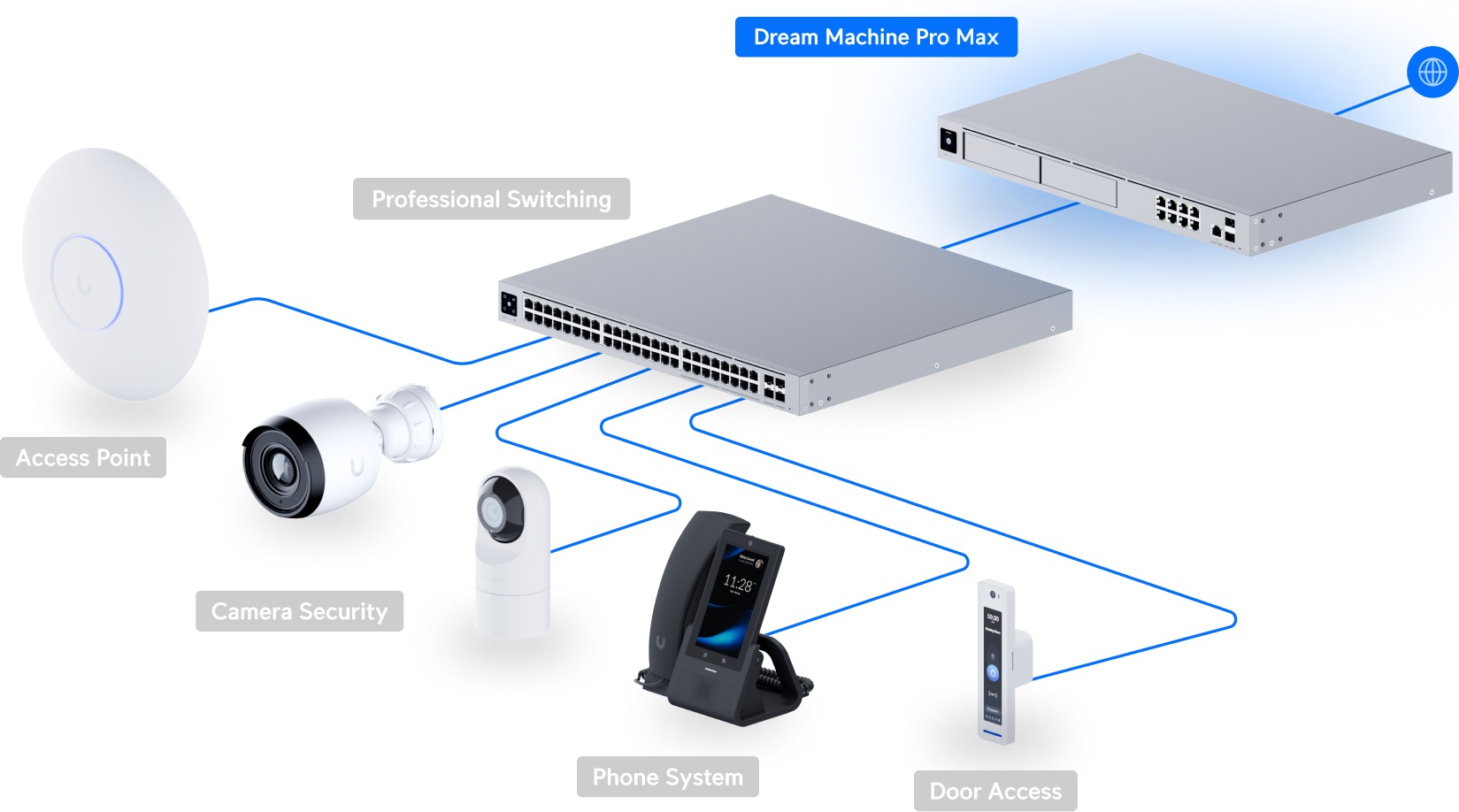
Installer note: the sweet spot is the 75-200 device site that will be a 200-device site in three years — multi-tenant offices, light industrial, schools, hotels. Customers approve $599 gateways more easily than a gateway plus a separate Network Server plus an NVR, and the consolidated box means one firmware track, one power drop, one UPS circuit.
Installer note: budget the disks at the same time. A Pro Max without surveillance drives is just an expensive controller; two WD Red or Exos drives in RAID1 is the config I commission, and the 128 GB SSD keeps the OS and containers off the video array.
Installer note: wire the 2.5 GbE RJ45 to your patch panel as the server/NAS trunk before you hand the SFP+ cages to the uplink — it saves a media converter conversation at handover.
Install Notes: Setup, Shadow Mode, and Firmware Reality
Day-one provisioning is the usual UniFi flow: adopt through the UniFi console over SSH, set the site timezone, claim the application suite license, and format the surveillance drives before attaching any cameras. Two things I do on every Pro Max deployment that people skip: first, enable Shadow Mode (VRRP) with a destination gateway even on single-homed sites, because a firmware brick mid-business-hours costs a truck roll and failover to a cheap second box is cheap insurance. Second, move the UniFi database verification schedule off the video array — the 128 GB onboard SSD is there for exactly this reason, and you want Protect’s continuous writes keeping hands off it.
CyberSecure is the throughput asterisk everyone should understand before quoting gig-plus circuits: Ubiquiti’s published 5 Gbps IDS/IPS figure assumes the signature engine at full tilt, which is fine behind a 1 Gbps or 2.5 Gbps WAN, but on symmetric multi-gig fiber the Pro Max becomes inspection-limited rather than wire-speed. Ubiquiti’s spec sheet puts IDS/IPS signatures at 55,000+ with CyberSecure; the ad blocker handles the easy wins, and DNS filtering with regional and application-based zone rules covers the rest. If the customer wants full inspection at 5 Gbps sustained with OSPF and BGP both active, the Pro Max is still inside its published envelope, but check thermals on the first week: the 100 W internal PSU and 205 BTU/hr heat dissipation rating are generous for the silicon, yet a closed, un-air-conditioned rack can cook any 1U ARM box.
Power deserves one more mention. The RPS DC input accepts the USP-RPS redundant supply, which is the only hardware-level redundancy on this box besides Shadow Mode; on single-PSU gear, I quote it on any site where downtime bills exceed the device price. Operating range is 14 to 104 degrees Fahrenheit and 5 to 95 percent non-condensing — adequate for conditioned telecom closets, not for the unconditioned shop bay where the APs survive fine but the NVR drive does not.
Bottom Line
The Dream Machine Pro Max is the answer to a question a lot of integrators are already asking: at what size does the Pro stop being enough? Ubiquiti drew that line at roughly 100 devices, and once a site is anywhere near it, the $220 gap to the Max is cheap insurance you will never have to re-quote. For big multi-homed entrances pushing past 5 Gbps with CyberSecure on, step up to the Enterprise Fortress line; for everything between the small-office gateway tier and the enterprise core, this is the default. Buy the Max, put two drives in it, and stop thinking about it for five years.Ready to size a UniFi stack for your site? Get in touch for a design review and quote.
Specifications and pricing sourced from Ubiquiti’s official tech specs page (techspecs.ui.com) and US store listing, November 2026. Product images courtesy of Ubiquiti Networks.