
TP-Link SG3218XP-M2 Review: The 16-Port 2.5G Switch Where Every Access Port Actually Gets the Speed
Most access-layer switches pretend to be multi-gig. They slap one or two 2.5G ports on the end of a bank of gigabit ports and call it future-proof. The TP-Link Omada SG3218XP-M2 takes the opposite approach: all sixteen RJ45 ports run at 2.5 Gbps, eight of them with PoE+, and two 10G SFP+ slots on the side for the uplink. After wiring more WiFi 7 jobs than I can count, this is the switch I now reach for when a site still has gigabit runs but the wireless side already moved on. Here’s the full picture, straight from TP-Link’s official spec sheet.
What the SG3218XP-M2 Actually Is
The SG3218XP-M2 sits in TP-Link’s standard Omada line — not the Omada Pro tier — and it’s positioned as the “smash the 2.5G barrier” access switch. The pitch is simple: WiFi 6E and WiFi 7 access points regularly exceed one gigabit on a good day, and a gigabit port is exactly where their throughput goes to die. Putting every access port on 2.5G base-T fixes that without dragging you into full 10G-to-the-desk pricing on copper runs that would need Cat6a re-cabling anyway.
It’s an L2+ managed switch with real static routing, full VLAN and security feature sets, and the usual Omada SDN integration — controller-based or standalone, ZTP, the works. Rack mountable, 1U, and the same physical footprint as the rest of the line, so it drops into an existing rack without rethinking cable management.
Verified Specifications
Everything below is from TP-Link’s official SG3218XP-M2 product page.
[image id=”29654″ align=”aligncenter” width=”884″] [/image]
| Item | Spec |
|---|---|
| Ports | 16× 2.5 Gbps RJ45 (8 PoE+, 8 non-PoE), 2× 10G SFP+ |
| PoE | IEEE 802.3at/af on 8 ports, up to 30 W per port, 240 W total budget |
| Switching capacity | 120 Gbps |
| Forwarding rate | 89.28 Mpps |
| MAC table / buffer | 16 K entries / 12 Mbit packet buffer |
| Jumbo frames | 9 KB |
| L3 features | 32 IPv4/IPv6 interfaces, 48 static routes, static ARP (128), proxy ARP, DHCP server/relay/L2 relay |
| L2/L2+ | 802.3ad LACP (8 groups), STP/RSTP/MSTP, port mirroring, loopback detection, IGMP v1/v2/v3 & MLD snooping, QinQ, voice VLAN |
| Security | IP-MAC-Port binding (512), DHCP snooping, ARP inspection, 802.1X + RADIUS, TACACS+, ACLs (L2–L4), storm control, port security |
| Management | Omada SDN (cloud, OC200/OC300, or software controller), web GUI, CLI (console/telnet), SNMP v1/v2c/v3, SSH, dual image/dual config |
| Console | 1× RJ45 console + 1× micro-USB console |
| Power / fans | 100–240 V AC; 2 fans; max consumption 299.4 W with full PoE load |
| Dimensions | 440 × 180 × 44 mm (1U), rack mountable, rubber feet option |
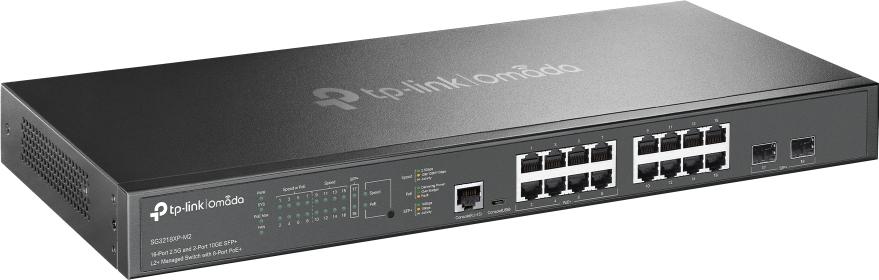
The 2× SFP+ uplink is what keeps this thing non-blocking on a loaded access layer.
How It Stacks Against Its Little Sibling
Most sites don’t need sixteen 2.5G ports — they need eight. TP-Link’s answer for that end of the range is the SG2210XMP-M2, so here’s the decision made visible:
| SG3218XP-M2 | SG2210XMP-M2 | |
|---|---|---|
| 2.5G ports | 16 (8 PoE+) | 8 (all PoE+) |
| Uplinks | 2× 10G SFP+ | 2× 10G SFP+ |
| PoE budget | 240 W | Smaller footprint, eight-port budget |
| Form factor | Full-width 1U rack | Compact, fanless-friendly wall/desk installs |
| Best for | The main access layer once more than ~8 runs want multi-gig | Single-office or IDF where eight ports cover it |
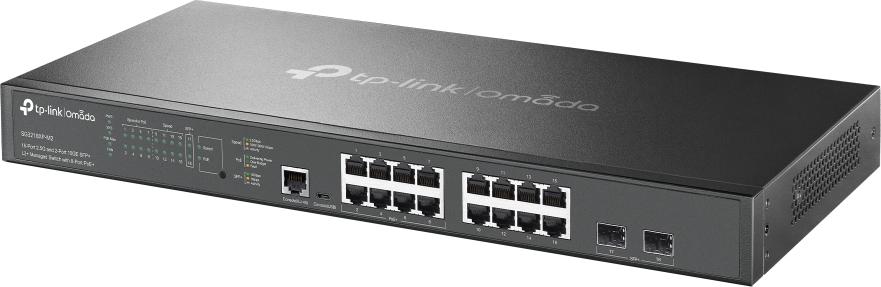
TP-Link’s own deployment diagram: PoE APs and cameras on the left half, data-only 2.5G gear on the right.
Where I’d Install It (and Where I Wouldn’t)
The sweet spot is a mixed access layer mid-upgrade. Pull your WiFi 7 APs onto the eight PoE+ ports — they’ll finally see more than a gigabit on the 160/320 MHz channels you sold the client — and use the eight non-PoE 2.5G ports for workstations, NAS, and servers that don’t need juice. The 240 W budget comfortably runs four or five 25–30 W radio APs with headroom; I size budgets at 80%, and this leaves you breathing room.
Camera consolidations work well here too. IP cameras behave fine on 2.5G ports even though they only link at 1G — auto-negotiation is your friend — and IGMP snooping with querier plus MVR means a VMS server on one uplink gets clean multicast without flooding every access port.
Where I wouldn’t: if the whole site is genuinely gigabit and will stay gigabit, this is money spent on speed nobody will touch for ten years. And if you need PoE++ (60 W or 90 W ports for dual-radio outdoor APs or PTZ domes), the eight ports here are capped at 802.3at/30 W — that’s the TP-Link Omada Pro S5500 line’s job, not this one. Same story if you need full L3 with dynamic routing; this box does static routing and smart-L2 housekeeping, nothing more.
Install Notes From the Field
- Cable it like you mean it. 2.5GBASE-T will happily run on Cat5e to 100 m, but on a bad termination it drops to 1G silently at the switch side. Term test every pair at 2.5G before sign-off.
- Watch the thermal math. Full PoE load puts this thing near 300 W draw and just over 1,000 BTU/h. Two fans, 1U — fine in a vented four-post rack, not fine in a closed box in a mechanical room with the projector rack.
- Use the micro-USB console. Nobody in 2026 carries an RJ45-to-DB9 anymore, and TP-Link knows it. Either console port works; the USB one just means one less dongle in the bag.
- Genuinely test the L3 slice. The 32-interface/48-static-route routing is real and usable for inter-VLAN on a small campus, but it’s static-only — plan the uplink design accordingly.
Picking the Right SFP+ Module for the Uplink
The SFP+ slots do all their advertised 10 Gbps only with the right glass in them. From TP-Link’s own accessory lineup: the TL-SM311LM is the multimode LC module rated to 550 m, which covers any in-building run you’ll realistically make; the TL-SM311LS goes single-mode to 20 km if you’re bridging between buildings on a campus or retail park; and the TL-SM321A is the single-mode BiDi unit (TX 1550 nm / RX 1310 nm, 20 km) for when you only have a single fiber strand to work with and don’t want to pull a second. Buy one spare of whichever you land on — SFP failures are rare but they’re always at 6 AM on a Monday, and a matched pair is the whole point of a fiber uplink.
The Bottom Line
The SG3218XP-M2 is the cheapest honest way to stand up a 16-port access layer where half the ports feed power and none of them bottleneck. Eight 2.5G PoE+ ports, eight 2.5G data ports, 10G uplinks, full Omada management, static routing, and real L2 security features — it does everything its price class claims. It gives up PoE++ and dynamic routing, which is fine as long as you buy it with eyes open. For a WiFi 7 refresh where the structured cabling is Cat5e/Cat6 and the budget won’t stretch to a full 10G stack, it’s the default box on my BOM.
Thinking about a multi-gig access-layer refresh for your site? Get in touch and I’ll spec it against your actual port count and PoE draw.
Specifications sourced from TP-Link’s official SG3218XP-M2 product page; product imagery courtesy of TP-Link.