
Grandstream GWN7700M Series Review: The Quiet Metal Box That Finished My 2.5G Install Chain
Why an Unmanaged Switch Deserves Its Own Review
Purely as a category, the unmanaged switch is supposed to be the boring part of a quote. You put it under a desk or on a shelf, plug in the patch cables, and forget it exists. But when the whole job runs at 2.5 Gbps or faster, the boring box becomes the frame limit on everything downstream of it. That is why I wanted to write up the Grandstream GWN7700M series — three small metal switches (GWN7700M, GWN7701M, and GWN7700MP) that deliver multi-gig copper access without a license, a controller, or a single configuration screen. If you install Grandstream GWN access points or any other gear that has already moved client access to 2.5G, this is the endpoint of that chain, and it is a lot more complete than the gas-station shelf hardware it is usually priced against.
The Lineup, Straight From The Spec Sheet
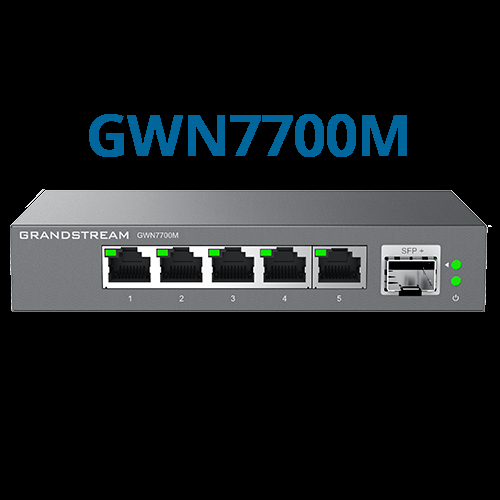
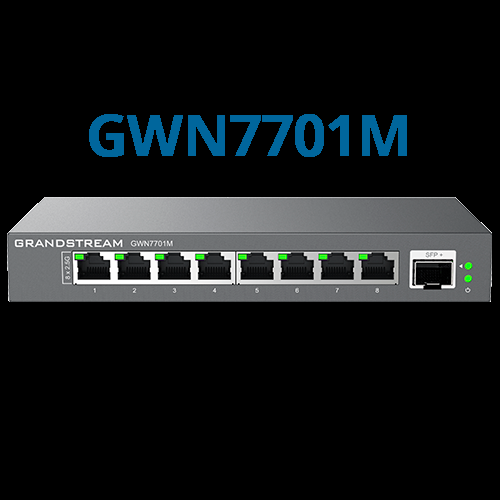
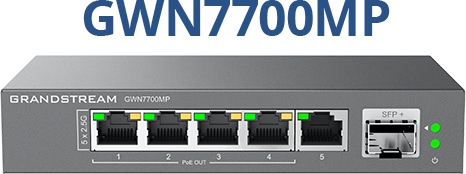
Grandstream builds the series in three models, and the differences between them are exactly the differences installers care about: port count and PoE.
| Spec | GWN7700M | GWN7701M | GWN7700MP |
|---|---|---|---|
| RJ45 ports | 5× 100/1000/2500Mbps | 8× 100/1000/2500Mbps | 5× 100/1000/2500Mbps |
| Fiber uplink | 1× SFP+ (1G/10G) | 1× SFP+ (1G/10G) | 1× SFP+ (1G/10G) |
| PoE | None | None | 4 ports, 802.3af/at, up to 30W per port, 57W total budget |
| Switching capacity | 45Gbps | 60Gbps | 45Gbps |
| Jumbo frames | 9KB | 9KB | 9KB |
| Enclosure | Metal | Metal | Metal |
Every model in the family speaks the same standards set: IEEE 802.3bz (2.5GBASE-T) on the copper ports, plus 802.3, 802.3ab, 802.3x flow control, 802.1p prioritization, 802.1x, and 802.3ae/802.3aq on the fiber side. Auto-negotiation and Auto MDI/MDIX work on all ports, so a 1G device on a 2.5G port just links at 1G and nothing breaks.
What The Feature Set Actually Gets You
The spec pages list a few items worth translating into installer language:
- Fanless, on all three models. Grandstream calls it “whisper quiet,” and for a switch that lives in a credenza, a classroom, or a reception closet with dry wall around it, that is not marketing — it is a requirement. Nothing on this series spins a fan.
- Broadcast/multicast/unicast storm control, fixed at 100Mbps. You cannot tune the threshold, but having the trip wire built in means a single misbehaving laptop with a bridged loop cannot scream into all your other ports at full rate. On an unmanaged switch, having storm control at all is unusual and valuable.
- IEEE 802.3x flow control. When a port’s buffers fill, the switch tells the transmitter to back off instead of dumping frames. This matters on aggregation moments — a backup window or NVR write stream hitting a 2.5G access port.
- QoS with default strict priority. Limited, but it means the switch is not treating your VoIP packets like file-transfer packets.
- Per-port LEDs for link/activity/speed, plus a power LED. When you are chasing a link that dropped on a six-port job, being able to see at a glance whether a port negotiated 2.5G or fell back to 1G saves an hour.
The GWN7700MP variant is the one that earns its suffix: four of its five copper ports put out 802.3af/at PoE at up to 30 watts each, with a 57-watt total budget. That is enough for a couple of Wi-Fi 6/7 access points and a camera or two at the end of a run where pulling a second cable for power is not happening.
Use Cases From Actual Install Patterns
The desk cluster. One 2.5G run to a workstation, the GWN7700M on the shelf under it: PC, laptop dock, USB hub, printer, and a charge stand all land on one cable back to the core. Five ports sounds small until you count what actually needs multi-gig at a single desk — it is exactly this number.
The two-AP micro site. The GWN7700MP is the shape of solution a small retail storefront needs: two Wi-Fi 6 APs pulling full 2.5G off two PoE ports, a credit card terminal, a back-office PC, and the SFP+ uplink back to the router over fiber or a multi-gig copper jumper. One device, no power bricks, no controller license.
The eight-port closet-in-a-box. When a home office outgrows a router’s four LAN ports, the GWN7701M becomes the aggregation point: NAS on one 2.5G port, workstation on another, everything else negotiates down gracefully. 60Gbps of switching capacity means eight 2.5G ports talking at once is nowhere near its ceiling.
Installation notes. These are plug-and-play out of the box — no configuration or installation required per the vendor. Mount them in ventilated spots anyway: metal enclosures dissipate through their cases, and PoE models run warmer when loaded. Put the SFP+ on the uplink, not on an endpoint. And check link LEDs on every 2.5G drop before you leave; anything that negotiated down has a cable or transceiver problem, not a switch problem.
Pros And Cons
Pros:
- True 2.5GBASE-T on every copper port of every model, not just a “multi-gig” uplink port like cheaper shelves use
- SFP+ uplink rated for 1G and 10G on all three models — a 10G uplink into a 5-port desk switch is rare at this class
- Fanless metal construction on every model; quiet enough for occupied rooms
- Storm control and 802.3x flow control at no config cost — protection most unmanaged boxes skip
- Manageable if you ever want it, through Grandstream’s GDMS Networking cloud, GWN Manager on-prem platform, or the embedded controller in the web UI — an option most unmanaged hardware simply does not offer
- The MP model is one of the few places you get per-port PoE+ and 2.5G copper on the same device this small
Cons:
- Storm control threshold is fixed at 100Mbps — no tuning
- QoS is strict-priority default only; no fine-grained policies on the unmanaged units
- Only four PoE ports, and only on the MP model — two APs and a camera and the budget is spent
- Five ports on two of three models is a tight fit the moment a job grows by one device
Bottom Line
The GWN7700M series is what the unmanaged switch looks like when a vendor that builds enterprise VoIP builds it — the standards list has flow control and storm control on it, the enclosure is metal, and nothing spins. For desk clusters and small sites that touch 2.5G but do not justify a managed switch, the straight GWN7700M is the closer; the GWN7701M when you need three more ports; and the GWN7700MP the moment power runs out before data does. If your access layer is already on Grandstream GWN gear, this finishes the chain in the same ecosystem on the same management pane, which on a small job is worth more than any single feature listed above. Need help sizing the access layer for a mixed-speed site? Get in touch — I will spec it honestly.
Specifications from Grandstream’s official product pages for the GWN7700M series (grandstream.com). Product imagery courtesy of the vendor, white space cropped.