
Ubiquiti UDM-Pro Review: The $379 Box That Still Runs the Rack
The Dream Machine Pro is the box that turned Ubiquiti from a “cool WiFi brand” into a platform serious integrators build whole sites around. It has been the default UniFi gateway in my rack designs for years — not because it’s the fastest or the newest, but because at $379 it does the job of three boxes and never files a complaint. Here’s a full installer’s look at the UDM-Pro as it stands today, with every spec pulled straight from Ubiquiti’s official store listing.
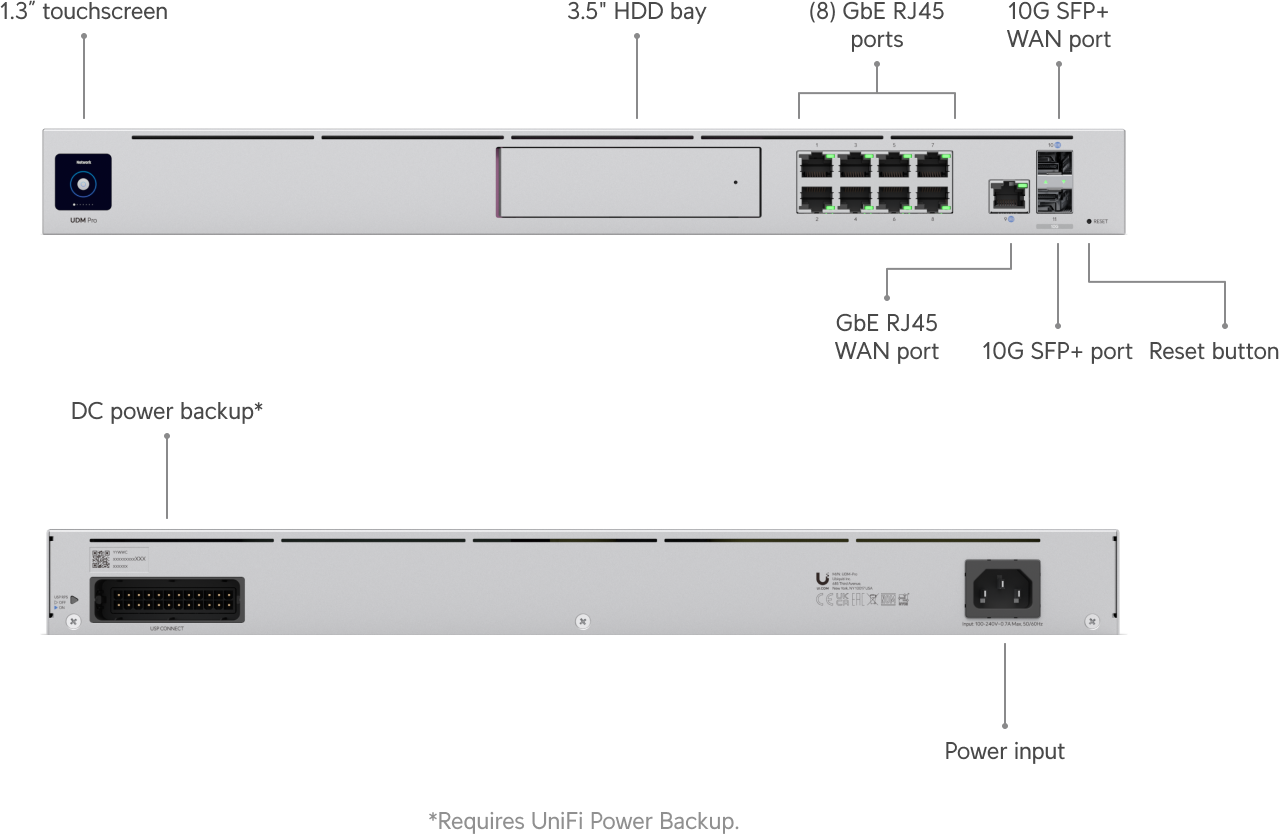
What the UDM-Pro actually is
The UDM-Pro is a 1U rack-mount cloud gateway that combines four roles in one chassis: a routing and firewall gateway, a hardware-accelerated IDS/IPS engine, a UniFi application controller (Network, Protect, Access, Talk), and an NVR with a built-in 3.5-inch drive bay. One box runs your network and your cameras. That consolidation is the entire value proposition, and it’s why this design has survived several generations of newer siblings without leaving my rack shelf.

Verified specifications — Ubiquiti official store
| Price (MSRP) | $379.00 |
| Form factor | Rack mount (1U) |
| Processor | Quad-core ARM Cortex-A57 at 1.7 GHz |
| System memory | 4 GB |
| Onboard storage | 16 GB (controller/OS) |
| NVR storage | 1x 3.5-inch SATA HDD bay (Ubiquiti offers 1–24 TB drives) |
| Ports | (9) 1 GbE RJ45 (1G/100M/10M) + (2) 10G SFP+ (10G/1G) |
| Default WAN | (1) 10G SFP+ or (1) GbE RJ45 — up to 8 WANs for failover/load balancing |
| IDS/IPS throughput | 3.5 Gbps (55,000+ signatures with CyberSecure) |
| Controller capacity | 100+ UniFi devices, 1,000+ simultaneous clients, 150 access hubs |
| Camera capacity (onboard) | 24 HD / 14 2K / 8 4K |
| Redundancy | Shadow Mode (VRRP) gateway failover; DC power backup (USP-RPS) |
| Power | Internal 50W PSU, 100–240V AC; max consumption 33W (112 BTU/hr) |
| MAC address table | 4,000 entries |
| Management | Ethernet + Bluetooth |
| ESD/EMP protection | Air: ±15kV, contact: ±8kV |
| Dimensions / weight | 1U; 3.9 kg (8.6 lb) |
| Operating range | -10 to 40°C (14–104°F), 5–95% noncondensing |
How it sits against the UDM-Pro Max
| UDM-Pro — $379 | UDM-Pro Max — $599 | |
|---|---|---|
| CPU / RAM | Quad-core A57 @ 1.7 GHz / 4 GB | Quad-core A57 @ 2.0 GHz / 8 GB |
| Onboard SSD | — (16 GB eMMC) | 128 GB integrated SSD |
| HDD bays | 1 | 2 |
| Ports | 9x GbE + 2x 10G SFP+ | 8x GbE + 1x 2.5 GbE + 2x 10G SFP+ |
| IDS/IPS throughput | 3.5 Gbps | 5 Gbps |
| Device / client capacity | 100+ devices, 1,000+ clients | 200+ devices, 2,000+ clients |
| Camera capacity | 24 HD / 14 2K / 8 4K | 50 HD / 25 2K / 15 4K |
| Max power draw | 33W (50W PSU) | 60W (100W PSU) |
The rule I give customers is simple: if the site runs over 150 UniFi devices, over 1,000 clients, or wants to record more than eight 4K cameras on internal storage, buy the Max. Under that line, the $220 difference buys headroom you’ll never touch — and that headroom stays parked as insurance you can failover into with Shadow Mode.
Where the UDM-Pro earns its rack unit
SMB sites that want one brain, not three
Law offices, contractors’ yards, small warehouses — the classic 20-user network with a dozen cameras and a handful of access points. One UDM-Pro with a surveillance-grade 8TB drive in the bay runs routing, VLANs, IDS/IPS, Protect, and Access with room to spare. No per-seat license fees, no cloud dependency for the controller, and the whole box sips 33 watts. That’s the trifecta every small-business owner actually cares about.
Fiber circuits up to ~3 Gbps with inspection enabled
The SFP+ WAN port takes GPON or XGS-PON ONTs directly, which keeps the WAN handoff clean — no extra modem box on the shelf. Just remember the asterisk every installer learns the hard way: 3.5 Gbps is the routing-plus-IDS/IPS figure. On a 5 Gbps symmetrical circuit with IPS switched on, box #1 works 1.5x harder than the spec’s sweet spot. Fine for bursty business traffic; buy the Max on a sustained-throughput design.
Failover designs that stay quiet
Shadow Mode is the most underrated feature in the UniFi line. Pair two gateways — UDM-Pro + UDM-Pro, or Pro + Max; they’ll fail over between models — and the standby takes routing and the application suite instantly if the primary drops. Add a USP-RPS DC battery to either unit and the site rides through outages that would reboot a modem-and-router shop. Total redundancy package is still under a grand.
Multi-site roll-ups under the capacity ceiling
Because the controller is onboard, a chain of five UDM-Pros can each self-manage its site with Site Magic meshing them into one pane. I put these in franchise footprints all the time: identical box at every location, zero monthly licensing, and one log-in for the whole portfolio. The 100-device ceiling is per site, and small commercial sites rarely brush it.
Install notes from the rack
A few things I do on every UDM-Pro install. Terminate the WAN on the SFP+ side even on a 1-gig circuit — a $10 SFP+ to RJ45 module on the ONT side keeps the failover logic on the fast plane and future-proofs the uplink when the circuit upgrades on you. Set the second SFP+ as a WAN2 member with a cheap LTE or second-fiber handoff and let the router do what it does best. Put the drive in before you adopt: Protect does a much happier job formatting a blank surveillance drive at adopt time than migrating one later, and you skip the re-indexing weekend. Finally, do yourself a favor and set the UPS/USP-RPS DC cable with a ferrite bead and physical strain relief — that DC backup input is the one cable on this box you cannot afford to have work loose.
Pros and cons
Pros:
- Gateway, controller and NVR in one 1U box at $379 — no per-seat licensing, no cloud subscription required
- Hardware IDS/IPS at 3.5 Gbps with 55,000+ signatures via CyberSecure
- 10G SFP+ WAN plus a second SFP+ for aggregation, a second WAN, or a high-speed server handoff
- Shadow Mode (VRRP) failover and USP-RPS DC battery support at a price where redundancy is actually affordable
- Nine GbE ports is still honest access capacity for most SMB racks
- Silent enough for an office shelf, efficient at ~33W / 112 BTU/hr
Cons:
- Single HDD bay — more than eight 4K cameras means an external shell or a dedicated UNVR
- No 2.5 GbE RJ45 anywhere; 1G access ports feel their age next to 2.5G APs — you’ll uplink through a switch
- 4 GB RAM gets tight when Protect, Access and Talk all run heavy at once; that’s the Max’s territory
- Single internal PSU — true power redundancy costs extra via the USP-RPS shelf
Bottom line
A lot of newer boxes have passed through this blog’s gateway shelf, and the UDM-Pro is still the value king of the UniFi lineup for the site it was built for: under 1,000 clients, under 150 devices, camera counts that fit one drive bay, and an internet circuit under its 3.5 Gbps IPS ceiling. Buy it for the integration, drop a surveillance-grade drive in the bay, add the USP-RPS if downtime costs money, and you have a three-box stack for roughly $500 all in. Past those numbers, the $220 jump to the Max is the cheapest insurance in the catalog.
Planning a UniFi build for your site? Get in touch and I’ll size it right the first time.
Product specifications and pricing verified from Ubiquiti’s official store product page (store.ui.com), November 2026. Product imagery courtesy of Ubiquiti.